The Athena and associated RSS module dates back to 2007. Previously a Platinum module, we've recently migrated most of the functionality into Yabber for use by clients, and a single page on your website now supports a basic news service. Athena is a news aggregation platform that indexes news via RSS feeds, sitemaps, and general crawling, with the sourced news articles evaluated in various ways to support your marketing, social, and engagement efforts. Athena also provides RSS aggregation for the distribution of feeds for client and personal use, but as supported by Matrix, the service provides a comprehensive RESTful API that provides large custom data sets.
Athena is massive, and the range of actions that may be applied to archived data is significant. In this article we'll look at the basics of displaying a news feed on your website, and how to use the most basic API endpoints for the most common data types. We'll create the full documentation with write information and the complete endpoint options when time permits.
Matrix Integration: Matrix is an API that indexes and analyses The Financial Web. An article titled "Understanding the Financial Web with Matrix" details (very generally) how it is used, and a number of other articles start to expose the various analytic and assessment endpoints. Any article ingested by Athena (or RSS Feeds) is evaluated by Matrix, and we'll details the process shortly (although it may also be accessed via Athena API directly).
Creating and Managing News Feeds in Yabber
Yabber provides a facility to have RSS and other feeds indexed, and these feeds may be grouped together to return custom 'aggregate' RSS feeds - one of which may be assigned to a page on your website... although the scalability of your website does allow for multiple (paginated) feeds to be rendered, although this functionality is discouraged for reasons we'll address later. RSS feeds can be freely shared and do not require authentication, although it's the key-protected API that returns far more comprehensive data and analytics.
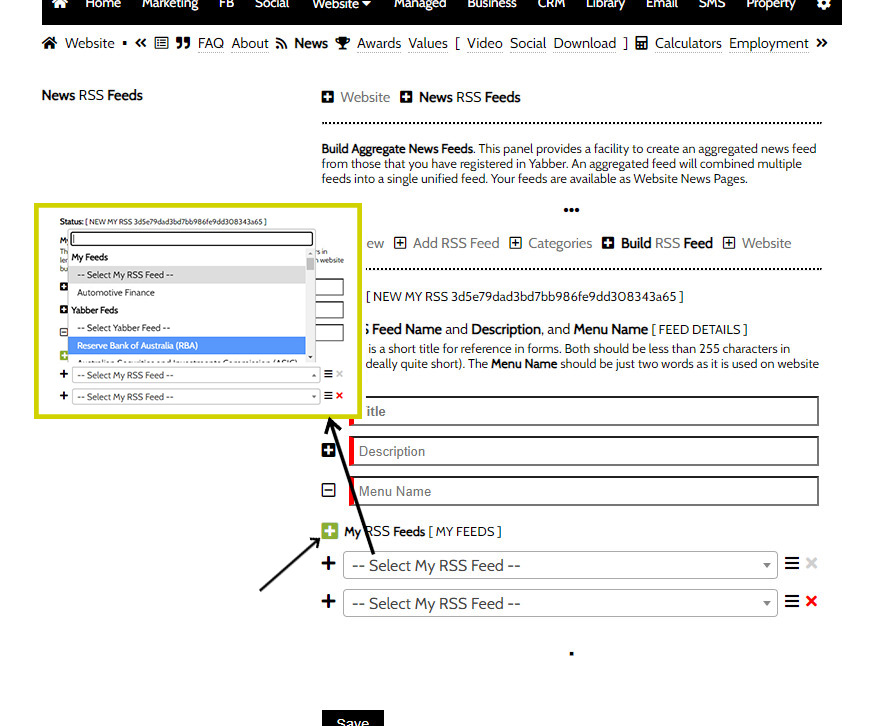
The process of managing news feeds is better left to our FAQ module where we can dive deeper into how the system is used. That said, for the sake of a rudimentary understanding, we'll look at the basics of feed management below. We'll look at the two primary functions necessary to create a public RSS feed: adding a feed, and building a public feed.
To add an feed to Yabber, you should navigate to the second page of Yabber's website module. Select 'Add 'Add RSS Feed', with the feed an RSS feed, search terms, or sitemap. Our FAQ module will detail the specifics but it's an intuitive process.
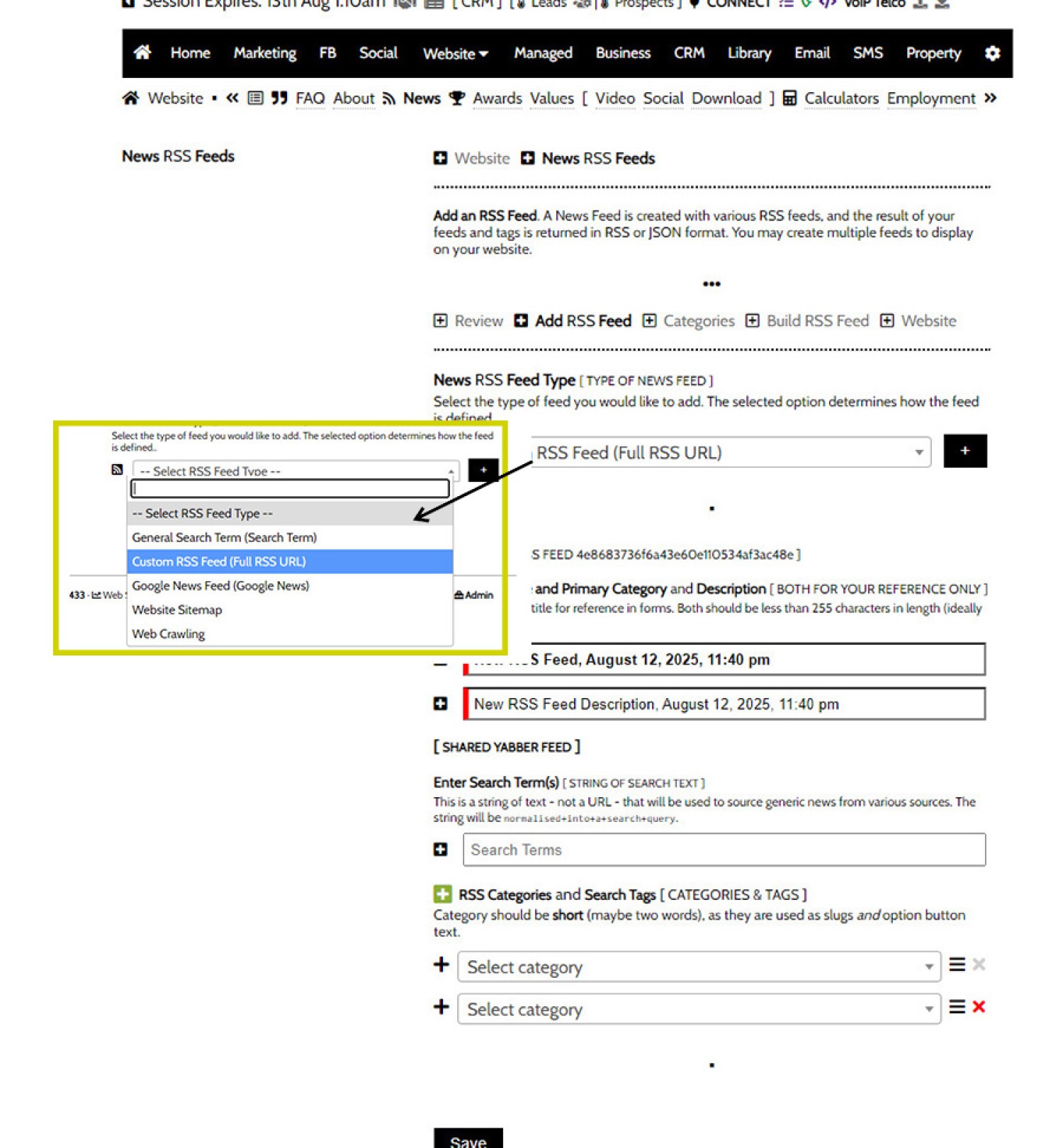
Pictured: To add an feed to Yabber, you should navigate to the second page of Yabber's website module. Select 'Add 'Add RSS Feed' and add an RSS feed, search terms, or sitemap. The FAQ module will detail the specifics but it's an intuitive process.
Once added, the feed will be processed shortly afterwards. This feed in isolation is pointless, as it's just a single feed. While single feeds can be referenced, that's not the point of aggregation - we want to add multiple feeds and access them in a single consolidated feed. Once multiple related feeds are added we'll navigate to the 'Build RSS Feed' panel and group related news, or create a custom feed.
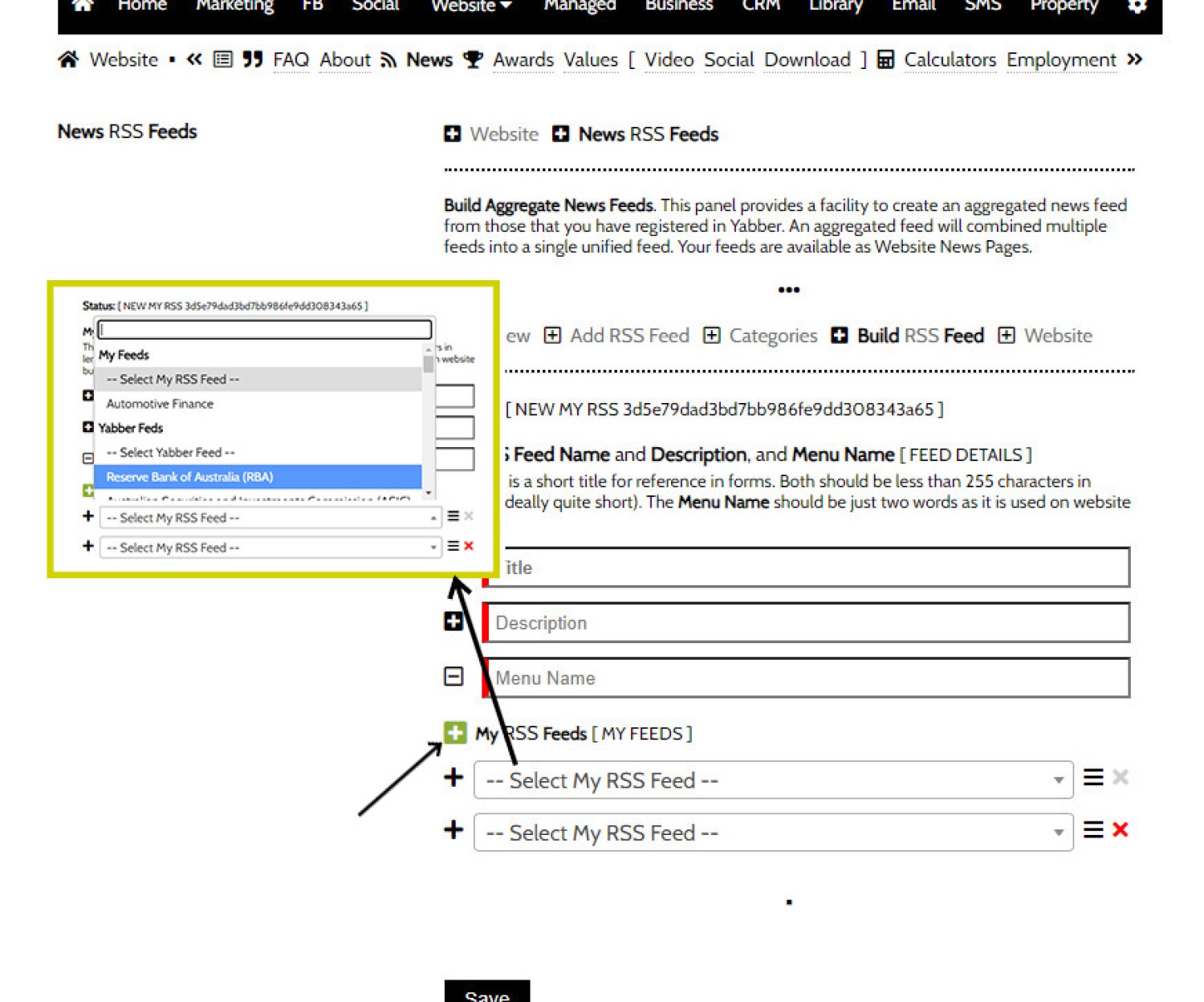
Pictured: We want to add multiple feeds and access them in a single consolidated feed. Once multiple related feeds are added we'll navigate to the 'Build RSS Feed' panel and group related news, or create a custom feed.
This single aggregate feed is now made available in the 'Review' panel as an RSS feed, and the aggregate data may also be referenced via the various JSON API endpoints.
Your Native Website RSS Feed: Whenever you create an aggregate news feed, we recommend that you include your own primary website feed as well. This means that any feed that's shared or used will always include your own articles.
The Review Table: At the time of writing, the 'Review' table is absent, meaning that editing and reviewing existing feeds is problematic. Domenico has just arrived back in Oz after a few weeks in Silicon Valley, so he's playing catch-up with newly migrated modules.
News on Your Website
Without going into funnel engagement psychology or case studies, we can summarise with a single statement: How many of your competitors provide access to curated news sources for their clients?
We've had a couple of people refer to our basic website as a 'Lamborghini tractor' recently, and I considered it a compliment given that the vehicle is described as the ultimate symbol or strength and style, and our mortgage broker website is the ultimate digital expression of expertise, education, entertainment, experience, and authoritativeness, and we've built the presence around the necessary elements in order to stand out and build trust when compared to your peers. Our website is more than just fluffy guff that overlaps with every other broker - we've created funnel-centric resources that keep people engaged, captures their attention, and has them coming back again... and keeps them from going elsewhere.
The above said, we only include one page of news headlines on our broker website which defaults to RBA related news... and the menu itself is buried and generally hard to find. Your website does have the capacity to render multiple pages of paginated news, but this is probably a bit much. The result of the single default news page is shown below, although a number of stylistic options apply so your experience will take on its own shape. Each news article headline passes through a redirector link that will retrieve various details before redirecting to the destination page.
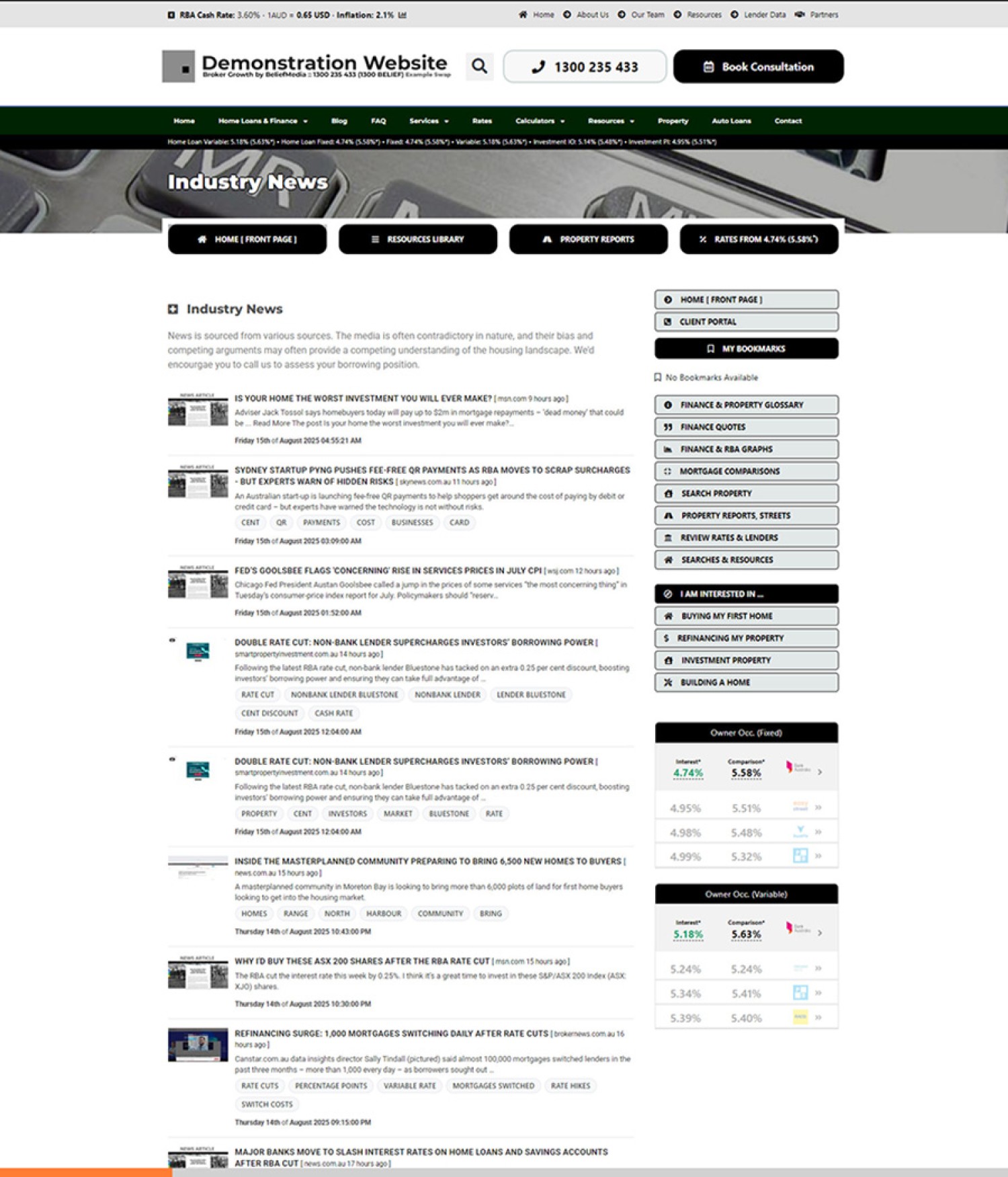
Pictured: The general appearance of basic news. Note that a default screenshot image is shown when the actual record isn't available, or when Matrix hasn't returned the image. An optional favicon is applied before the news item which assigns some assurance to the destination URL. Tags and Keywords are applied when available, and if using an advanced module (or a standalone archive as made available in our comparison site), the keywords and tags are created as website tags allowing the user to bounce around your resource based on their specific interest. If multiple feeds are created on your website, the right menu is replaced with the various feeds (using the 'Menu' text option as defined in Yabber). Remember, RSS Feeds on your website are as old as RSS itself, and supported natively in WordPress via Simple Pie, there's nothing fancy about it. Our value comes not only in the customisations that may be applied, but also - and more significantly - in the backend API that provides various insights.
Each record includes a title, (redirector) link, article thumbnail if available, published time, and in most cases, a destination website favicon. The rendering above is largely irrelevant because you'll style in a way that suits you with news articles that are most relevant to your market position.
Favicons and Screenshots: The favicon associated with the news website can't always be resolved, and in other cases these websites will block certain requests, and in these cases we'll render a default icon to represent the feed. News sites take care to protect themselves from 'theft' or illegitimate access to their material, so screenshot thumbnail images are replaced with a default image if not available.
News Favicons: Favicons associated with news sites are archived within a dedicated favicon module that's separate from the Yabber favicon library. The latter module is an archive with millions of icon records, and these icons are usually associated with search results and internal website links. Both APIs are available via the matrix/favicon/get.json endpoint.
If a full news module is required (and it generally shouldn't be), the sidebar on the right is replaced with news categories, with the 'menu' name defined in Yabber (you'll see the 'Menu Name' field in the Yabber image shared earlier  , and this is the text applied to buttons.
Product Comparison Engine: Most of our clients are waiting for the delivery of our website-integrated comparison engine, but some will see a standalone comparison website, and in the latter resource we'll return all news in the paginated format that'll make the millions of archived records available. The standalone comparison engine is positioned very differently to your standard business website and provides a broader more holistic service.
You obviously don't need Yabber for website news... and used incorrectly it can appear a little tacky. However, with a well crafted and relevant feed or feeds, you can build a real presence that'll keep your clients coming back. If you simply supply the naked RSS feed, your own articles injected into every feed will ensure that you're always top-of-mind.
For clients, 99% of you will read no further from this point, and that's expected. Most businesses simply want to understand the basics, and how news is rendered on their website. For those that want insights into broader news analysis that helps shape broader content strategies, the API might be of value.
Public RSS Feeds: It's likely you'll create public RSS feeds, and you should list these on a page with information relating to the feed. When you build an aggregate feed, ensure you include your own website RSS feeds to ensure that all your articles are delivered to a;; users.
Consuming and Reading RSS Feeds: There's dozens and dozens of basic RSS readers available for Android and Apple devices, and it's likely you have one on your smartphone right now without knowing it. You may also add feeds to Outlook directly, and it's here where we tend to use general feeds most often. A daily feed with tags and keywords is manufactured by the Insights API every day, and this 'protected' feed is encouraged (in Outlook) so you're kept abreast of trending news cycles. Outside the scope of this article, news is also published to a protected Usenet server that we maintain.
Standalone News Resource: If a standalone News resource is maintained, each news item includes an optional links that takes the user to a standalone news article. The returned Matrix feed includes an AI-summary of the news and other (indexed) related articles. The full screenshot is often used on this page (if available) as a means of assigning trust to the destination website.
■ ■ ■
Basics of the API
The basic API request includes a module and an action with a number of optional URL parameters (including the API Key). Each request is made to {module}/{action}/news.{rss|json} (where the module and action are modified based on the required data). The modules we'll look at in this brief article includes the more common read-only modules:
- rss - Generating public RSS feeds.
- athena - General News in RSS format.
- youtube - YouTube video RSS feeds.
- insights - General keyword insights and broader Matrix data.
- matrix - Data sourced via the integrated Matrix API.
- website - News data linked to from news modules on your website.
- statistics - General statistics data.
- helper - Data to assist you in local data usage.
Important modules not discussed in this article include browse, search, and finance, and a number of URL parameters are ignored for simplicity, such as pagination information. The search action is quite useful because it allows the quick creation of user and public feeds without having to construct them in Yabber.
Any request made to an RSS feed, or any request to the API, will include the module before specifying an action. For example, when we access the latest news from all feeds, we'll use rss/my/news.rss.
All requests to the standard RESTful API now requires an API Key (after operating the system for over 15-years without the need). An API Key should never be attached to an RSS Feed.
General RSS Feeds
Introduction
We introduced this article with a brief introduction to feed aggregation, or the merging of multiple feeds into a single response, and it's these feeds that are available via various RSS endpoints. Output is as you'd expect.
In the case of all RSS feeds, the .rss extension may be replaced with a .json file extension to return more detailed JSON (as detailed shortly).
Following is a list of general RSS feeds.
My RSS Feeds
The rss/my/news.rss feed returns all your latest aggregated news of all types from all feeds, and it's usually something you'll use yourself. The parameter of site_id is required as a URL parameter for identification. If site_id is invalid or not present, we'll default to the Athena feed as detailed next.
Athena Feeds
The rss/latest/news.rss feed (an alias of athena/latest/news.rss) returns the latest system 'default' news feeds. Default news feeds are focused on business and consumer facing information so they're generally not suitable for client use.
Custom Aggregate Feeds
Your aggregate feeds - or those feeds that are the result of combining two or more other feeds - are the feeds you'll share to your clients more often than any other. The subject-heavy feeds are created in Yabber as detailed earlier, and the feed URL is created with the action value referencing the aggregate feed_id. For example, athena/{feed_id}/news.rss returns the combined feeds.
YouTube RSS Feeds
The YouTube feed isn't associated with Athena directly, but access is provided via the youtube/{videos|primary}/news.rss URL. A site_id (associated with any of your websites) should be provided to identify you, and a channel_id should be provided as a URL parameter to return any feed other than your primary channel data.
RSS URL Parameters
There's a large number of URL attributes that alter the feed in some way, but it's the following three fields that are used more often than any other:
- number. The number determines the number of news items returned.
- site_id. For generic 'latest' and other feeds that reference your news, the
site_idis used to identify you in place of an API Key. RSS feeds are public in nature so you shouldn't ever expose your key. Thesite_idis a public value. - athena. In most cases, data returned is user data and excludes general Athena feeds. When required,
athena=truereturns Athena data. Documentation will detail specific usage.
Other attributes will be detailed when documentation is published. Generally speaking, you may migrate Yabber entirely and craft the feed entirely with URL parameters.
RSS JSON
As detailed earlier, any RSS feed may be returned as JSON simply by changing the rss extension to json and including your API Key in the request. The athena and rss modules will always return two array keys in the JSON: item (feed details), and items (news items). The items array is similar to the standard news response provided via the website and other news endpoints.
Website & News JSON API
The website module returns JSON data via the latest, {website_default}, or custom actions. For the sake of an example, we'll return a response accessed via the website/latest/news.json endpoint.
Each page returns 20 results by default (altered with the number URL parameter),We've snipped example text from a result from near the middle of a typical response. Note that some information was snipped for readability.
Because the JSON data is intended for rendering on a website or to be used programmatically, we include tags, keywords, and screenshots by default. The article_clean key returns the full article content with only image and video media, but it should be requested separately via the Matrix article endpoint only if required, and it should never be displayed in full (for obvious copyright reasons)... so use it only for analysis.
Favicon Usage: Note that the favicon local URL includes either a eicons or icons directory (for reference only), and this tells you whether the icon was extracted from an ico file, or whether the icon was copied directly. In practical terms, the distinction has no relevance, but it's important to know that if a website only supplies an ico file we'll extract all the embedded images.
Screenshots: If the screenshots are available, we'll return a 1920x1080 version, a medium version, and thumbnail. While we return default values for medium and thumbnail images, the actual size is defined by you in Yabber.
The counts key will return the number of times that the link was visited (assuming the redirector link was used). Aggregate visitation is available via the statistics module. Some values - such as hash (record_id) and domain_id - may be used to query other news articles or statistics.
Relevant top-ranked tags and keywords are returned but limited to just 15 results. You may query the terms and keywords Matrix endpoint for complete data sets and comprehensive analysis, and it's this endpoint that tends to feed us with trending data. The insights module also provides term and keyword data for various time intervals and trending terms, but this is a basic feature on the Athena endpoint and not nearly as comprehensive as the Matrix API.
The Matrix API
All news articles are evaluated in full via the Matrix API, and returned data is virtually identical to standard page responses with the exception that we include daily, weekly, and monthly statistics alongside related and geographically relevant news (the latter returned only if resolved). Matrix data is returned via Athena via the matrix/page/news.json endpoint.
Athena Insights API
The Athena Insights endpoint provides basic term and keyword trends over various time periods. The Insights made available via Athena are not to be confused with the Insight API which is a dedicated tool that archives every finance-related advertising published by any Australian business.
The most basic Insight actions include the following:
- today. Keywords from today with the count of the keyword occurrence.
- week. Keywords from the past 7 days with the count of the keyword occurrence.
- month. Keywords from the last 28 days with the count of the keyword occurrence.
- keywords. General keyword analysis with emerging consumer trends. Keywords is heavily weighted against the Porter Stemmer algorithm.
- trending. General keyword analysis with emerging consumer trends.
- dates. Keywords returned over specific date ranges.
All insights data is measured against your own feeds by default. Including the attribute of athena=true into the URL includes an analysis of the comprehensive and specifically crafted system news archive in company with your own.
An example response to the insight/today/news.json endpoint returns something similar to the following:
Over a thousand results were returned so the array is snipped for readability, and some of the keys were altered with a space only to avoid the text interpreted as shortcode.
The today result tends to return keywords closer to trending data, but the trending action serves results that are crunched with an 'emerging' algorithm, meaning that returned insights are closer to broad borrower sentiment. The module shouldn't be confused with our Sentiments API which measures web, social, news, article, and other content in order to general a broad consumer 'mood'.
Athena Statistics
There's no limit to the data you can request from Athena, but the following actions on the statistics endpoint that tends to return results that are most meaningful.
- today. Return the number of articles returned today ordered on the count of articles evaluated.
- week. Return the number of articles returned in the last week ordered on the count of articles evaluated.
- month. Return the number of articles returned in the last month ordered on the count of articles evaluated.
- counts. Number of Athena (system) articles ingested ordered on the number of articles indexed by Matrix.
- visits. Number of Athena (system) visits. Indexed on the domain name and showing the visitation count as the value.
- domains. Number of Athena (system) visits by domain count. Indexed on the domain name.
- mycounts. Number of user feed articles ingested ordered on the number of articles indexed by Matrix.
- myvisits. Number of user feed visits. Indexed on the domain name and showing the visitation count as the value.
- mydomains. Number of user domain visits by domain count. Indexed on the domain name.
- athena. General keyword analysis with emerging consumer trends.
Athena system feeds are rather extensive and tend to provide far more value than a limited subset of news that you might add yourself.
An example response to statistics/today/news.json returns the following (the visits value was truncated to 0):
If weekly or monthly results are queried, each day will be indexed on the applicable date.
Each feed should be queried once to get a feel for the response. The athena action returns a full statistical athena breakdown which includes the number of feeds, articles, visits, locations, global statistics, distinct visitors, BMUID, and other data.
Geographic Statistics: Whenever a news item is resolved to a location, the geographic position is recorded which allows queries based on a latitude/longitude point and radius, and the postcode endpoint returns all news nearest to the defined suburb. All user data is geographically coded so you may also query readership or certain article types by geography - a useful tool when planning advertising audiences. User data is often limited and unlikely to return significant insights, but the Athena data is built on the back of thousands using the various feeds, so returned data is highly accurate.
Helper Action
Athena is always growing, so as each response is returned you should generally create referenced domains and other data locally (if required), so helper functions are largely irrelevant. Responses are only provided in the absence of any significant Swagger file.
Helper actions include (but are not limited to) the following:
- domains. Returns all distinct domains indexed on the
domain_id. - geo. Returns all continents, countries, states, and regions indexed on the applicable term ID.
- myfeeds. Return the number of articles returned in the last month ordered on the count of articles evaluated.
- myfeed. Number of Athena (system) articles ingested ordered on the number of articles indexed by Matrix.
- athena. Number of Athena (system) visits. Indexed on the domain name and showing the visitation count as the value.
- types. Number of Athena (system) visits by domain count. Indexed on the domain name.
- categories. General keyword analysis with emerging consumer trends.
User results are returned by default, and athena=true returns system (Athena) data.
The helper/myfeeds/news.json is helpful because it returns all your constructed feed indexed on the record_id used in general website or other queries. An example response is as follows:
In this case, the record_id is the reference to the specific feed, although every user feed may be returned with helper/myfeed/news.json. The is_athena key indicates if the specific feed is 'owned' by the user (is_athena with a value of 0 indicates a user feed).
The relevance of the above is that the first feed is an Athena feed used to render general results on user websites until custom integrations are applied.
Considerations
We've barely scratched the surface when it comes to Athena functionality, so if you're interested in exploring the nested and AI-driven functionality of the system, you should contact us for a bigger discussion.
In the real-world, the data returned via Athena (and by extension, Matrix), generally guides content-related decisions. You can't rely on guesswork or rhetoric when it comes to the valuable time you assign into your marketing reach, so to ensure your budget and time is best spent you should lean on definitive and conclusive results. This said, the Insights API is far more powerful in resolving consumer sentiment and should generally be used as a gospel 'instruction guide' when it comes to how your marketing budget should be assigned. Supported by BeNet, Insights will provide the content and tools that are proven to deliver results.
Write Endpoints. The Athena API has a write endpoint that accepts POST requests, and the functionality is used primarily to create, manage, and modify feeds. Outside the scope of this article, the write function also integrates with the Sendify social module, although the latter functions are only accessible to our managed client groups.
Conclusion
Information is both the raw material of decision-making and the currency of competitive advantage. Businesses and individuals alike require not only data, but also context—insights that help transform a constant flow of news into actionable understanding. While media sources inevitably carry bias, they also offer diverse perspectives that extend beyond the narrow confines of an organisation’s internal knowledge base. This diversity of input aligns with bounded rationality theory, recognising that decision-makers operate within cognitive limits and therefore benefit from curated, high-quality external information to mitigate blind spots.
Your platform’s news aggregation API plays a pivotal role in this process. By integrating relevant, timely, and multi-perspective content directly into your digital ecosystem, you provide users with the informational breadth necessary to make informed, confident choices. This is not merely content delivery — it is decision enablement. According to information foraging theory, individuals gravitate toward sources where the “information scent” is strongest, and by embedding credible, relevant news within your website and other platforms, you position your business as that high-value destination.
The aggregated news resources function as powerful top-of-funnel (or mid-funnel) asset in your marketing architecture. Anchored in reciprocity and authority bias, consistent delivery of valuable insights fosters trust, positions your brand as an industry guide, and subtly primes users for deeper engagement. By meeting audiences at their point of curiosity and guiding them toward informed action, your platform becomes not just a conduit for news, but a strategic partner in their decision journey - ultimately translating informational richness into measurable business outcomes.
Bottom line: your news feed is not merely decoration.