We've had a large number of people ask us about the AI-driven Licence (and general document) upload form tool lately, so this article serves as a basic introduction. The method of integrating the functionality into general forms, and the client-side upload tools in your client dashboard, will be detailed in our FAQ module, so this article serves as a brief overview. In short, the function of the primary tool is simple: upload a photograph taken from your smartphone camera, return the extracted textual results, and populate form data.
We first wrote about our AI-supported API in an article titled "How our Optical Character Recognition (OCR) API and Tools Will Improve Your Workflows" in early 2023, and while we've had an OCR API since 2015, the AI integration was only introduced in 2022. It has since been used to support the equipment application forms used by about 1000 auto companies, and generally used by a smaller number of mortgage clients. It's nothing new.
It should be noted that while a large number of businesses have talked to me about this feature, it's an entirely pedestrian bread-and-butter tool that is no way difficult to create, and I've long questioned why more CRM systems don't include this basic feature.
What is Optical Character Recognition: Optical Character Recognition (OCR) is the process that converts an image of text into a machine-readable text format. For example, if you scan a form, drivers' licence, receipt, PDF or any type of image from a client (including a photograph), the AI-powered OCR facility will evaluate that object, extract the text, and save the resulting information to a database. Our OCR API returns extracted text in addition to other resolved information, and this data can be used on your page for a number of reasons - including populating form fields.
Stripe: You may have used this feature in Stripe to verify your identify. Stripe will take a picture of a licence and then compare that against a series of selfies - a process we've exposed as seriously flawed after cheating the system by pointing the selfie shots at a TV. We don't support image and/or video for verification for obvious reasons.
Facebook Group: You will find some examples and screen recordings in our 'general' Facebook Group  . We share a large amount of information to our Group that we don't share anywhere else.
How the AI-Supported OCR Camera Upload is Used
The API itself is used in one of two ways; the form-integrated photo upload that returns data and populates fields in a form, or the basic upload - the latter being a simple way of collecting client details.
Upload Security: It's worth noting that sensitive documents are encrypted before uploading, and any third-party or one of the many free systems that doesn't perform this system should never be used. Some endpoints (such as those for social media) may not be encrypted unless a flag is carried in the request URL forcing the requirement.
The APIs primary function is for integration in Formly forms, but the feature can be used anywhere for any reason, including the quick uploading of documents or photos to client tasks or notes. There's really no end to the number of uses the form field may be used.
With the introduction of the mortgage broker website client portal, the feature will soon be introduced as an option for the uploading of various documents.
Photo Exif Data: When we upload via canvas.toBlob() (or toDataURL()), the browser re-encodes the image and strips out all EXIF metadata, and this is a very intentional browser security feature that never exposes identifying data when streaming to video and canvas. However, there are times when certain meta data is required - such as uploading photos that are destined via our Property API - so we request the user location on page load for accurate latitude and longitude. Why do we need geographic coordinates of property photographs for the Property API? We don't, really, but it helps us resolve uploaded photos to a property address without the system having to specifically ask the question... so it just jumps a couple of nuisance steps. If we're uploading camera photos directly to Sendify (social module), the coordinates may be used in other ways. For auto dealers that are asking photos or trade-ins from 'randoms', the location adds a measure of assurance to the returned images.
The AI OCR component of the API is only actioned when explicitly instructed via an alternate endpoint because most uploaded images do not require this level of analysis,. By design, anything uploaded via Formly will return extracted text data (and then try and populate forms), and anything uploaded via the general API will return basic data (and geographic coordinates if browser permissions were allowed).
The Basic Upload Process
Basic uploads on mobile devices are normally actioned in modals, but a standalone page may also be used. If a popup is used on a desktop device and a camera cannot be found, the standard drag-and-drop capture area is used. The process itself is quite simple: launch a modal, take a photo, then upload or take again. When each photo is taken an option will be returned to take another photo. For every basic Camera page we present an option to include notes, although each panel - depending on its purpose - will present slightly differently and include other options.

Pictured: The process itself is quite simple: launch a modal, take a photo, then upload or take again. When each photo is taken an option will be returned to take another photo. For every basic Camera page we present an option to include notes, although each panel - depending on its purpose - will present slightly differently and include other options. The last image shows the small 'Notes' area that is shown when selected.
Modals will always have an option to close the window.
As noted earlier, all EXIF data is stripped from the uploaded photo or image, so we ask for location information for certain API requests, such as Property and Equipment/Auto, and these values are sent to Yabber and returned in the JSON response.
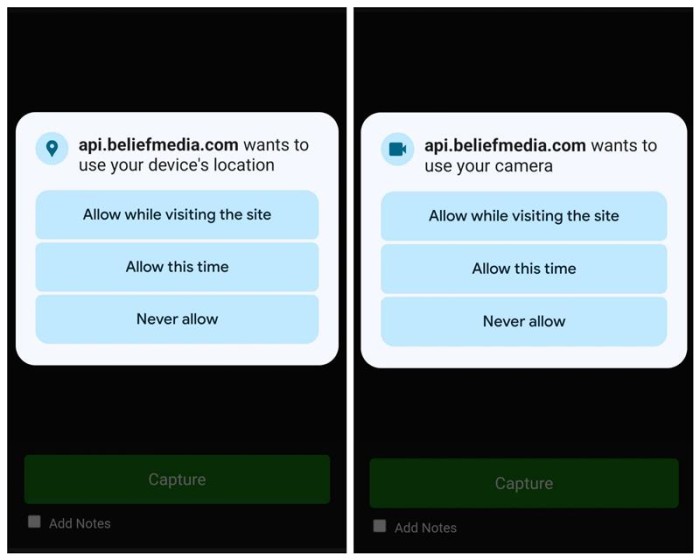
Pictured: All EXIF data is stripped from the uploaded photo or image, so we ask for location information for certain API requests, such as Property and Equipment/Auto, and these values are returned in the JSON response.
In most cases, the server-side code is installed on your website, so the message that pops up on your website will show "YourSite.com.au wants to use your device's location".
If the Camera panel is associated with a Formly form (or any other form with appropriate IDs set) - each field will populate with values resolved via the OCR engine. Typical form fields include first_name, last_name, middle_name, name (in a full single field), and licence_number, but there's literally no end to the number of fields that can be populated automatically since it resolves based on returned data.
API Endpoints and Responses
All API requests are made to the photos endpoint with a required action. In general cases the action will simply be upload, while ocr, social, and crm are also expected. Data may be submitted via a standard POST request, or POSTed with a JSON body including base64-encoded image data. All requests expect an API Key, and each endpoint expects certain URL parameters (for example, crm and ocr will always expect a client_id, while social will expect a profile_id, and so on - these will alll be introduced in documentation and/or FAQs).
Primary endpoints are as follows:
- photos/upload.json. This is a general endpoint that does nothing except filter an image to your private gallery. It is not associated with any module.
- photos/upload/{module_name}.json. This is the primary endpoint used for property and auto requirements. The {module_name} is replaced with a string of alpha text. This module is used for about a dozen modules that includes Formly forms.
- photos/ocr.json. This is the primary OCR endpoint for reading uploaded files and/or images. The endpoint requires a
client_id. - photos/{hint}/ocr.json. This is the primary OCR endpoint for reading uploaded documents and information related to an application. The endpoint requires a
client_id(automatically applied, obviously, if a client is logged into your Client Portal). - photos/social.json. This module is used to send images to social media. Details will be found in the FAQ modules.
- photos/crm.json. This endpoint is used to associate photos or images with a client in your CRM. It is used an as alternative when OCR is not required.
Not discussed in any great detail in this article is the videos endpoint which includes the following:
- videos/video.json. This is a general endpoint that does nothing except filter a video to your private gallery. It is not associated with any module.
- videos/{client_id}/crm.json. This is the primary endpoint used for videos associated with a client record - created for compliance or any other reason.
- videos/notes/crm.json. This is the a general endpoint used for account owner video note creation.
- videos/social.json. Videos that will be sent directly to social (based on supplied
profile_idor hashtag in the Notes section).
Videos will always be evaluated via our Speech-to-Text (STT) API with full transcripts recorded in Yabber.
The API now requires an API Key (apikey), but we do provide a free API Key in certain cases. All API Keys previously issued will continue to function (given that the system was free until the last week), The key may be passed in the URL, posted via an intermediate handler (to avoid exposing the key), or via the header.
Lte's look at a typical response via the upload of a Drivers' Licence. We'll send the data to the photos/licence/ocr.json. The licence 'hint' simply tells the system to look for specific text fields (ensuring they output with a consistent key in the returned JSON), although all fields are always returned regardless.
Note that some records are duplicated for backwards compatibility. The data array is compared against form field names and populated as required.
Considerations
Despite the perceived complexity of adding the Camera, OCR, and other features into a form, the system is not complex, and in most cases can be hacked together by any competent developer in about an hour. What can often be more difficult is integration into various CRM systems, but we've created open source code that makes this step a simple process.
We've hesitated to implement advanced solutions in the past, but as this and other 'pedestrian' tools become more mainstream, we'll push an array of features into our standard website and build on our open source library.
In a world where 'web designers' in the industry sell a form as a feature, we dare you to compare against our superior suite of products.
Practical website implementation will be introduced in our FAQ module, and full API documentation will be created when time permits. We haven't scratched the scratch in terms of outlining system capabilities in this short article.
Conclusion
What emerges from this overview is that the true value of our AI-supported OCR and document/video upload API lies not in its technical novelty, but in the flexibility and universality it affords to everyday workflows. The ability to capture, analyse, and resolve structured data from unstructured client submissions—whether that be a licence photo, a compliance document, or even a short-form video—removes layers of administrative friction and integrates seamlessly into existing business processes.
The architecture is deliberately modular: one endpoint may serve the pedestrian requirement of a simple photo upload, while another invokes the OCR or STT (speech-to-text) engines for deeper analysis. This modularity means the same core technology is equally relevant to auto dealerships seeking trade-in verification, mortgage brokers processing compliance forms, or property agents reconciling field data. By design, the tool does not impose rigid boundaries; rather, it allows each organisation to decide how deeply they wish to embed AI-driven recognition into their workflow.
It’s important to underline that this kind of automation is not a “nice-to-have.” In a business environment increasingly defined by speed, compliance, and client expectations of frictionless engagement, tools like this become essential infrastructure. What once required multiple touchpoints—manual transcription, data entry, cross-verification—is now collapsed into a single, secure client interaction. That is where the transformative value sits.
While I continue to argue that OCR and AI-enabled upload tools should be considered baseline features in modern CRMs, our decision to publish open implementations ensures that businesses of all sizes can adopt, adapt, and extend the system. This openness not only accelerates adoption but also positions the API as a foundation upon which broader digital strategies can be built.
The strength of these and other Yabber facilities is not merely their technical capacity to "read" a licence or transcribe a video, but its capacity to integrate flexibly across a spectrum of use cases, empowering businesses to automate intelligently, securely, and at scale.