Wistia is a third-party video hosting service that is tailored specifically to marketing efforts. The service charges a significant premium for hosting but they do provide a free option for three videos which we encourage you to use. You may register your free account at Wistia.com  .
.
This FAQ will show you how to connect Wistia to Yabber, and how to set up the webhook URL that will accept incoming data from Wistia.
The Wistia Connect Panel
You will find the Wistia connect panel by following the blue video icon in the Social module. Then select the 'API' option in the Wistia submenu.
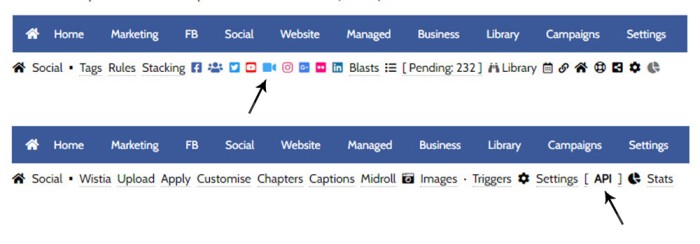
Pictured: You will find the Wistia connect panel by following the blue video icon in the Social module. Then select the 'API' option in the Wistia submenu.
A panel will be returned with your API key. If not previously defined, we'll populate it for the first time, so we'll need to venture over to our Wistia account to retrieve the value.
1. The API Key in Wistia
You will find your Wistia API Key by following the Settings menu item in your Wistia dashboard (top-right), and then the 'API Access' in the left-solemn submenu. The token (or the 'Password' as named in Wistia) should be copied for inclusion in Yabber.
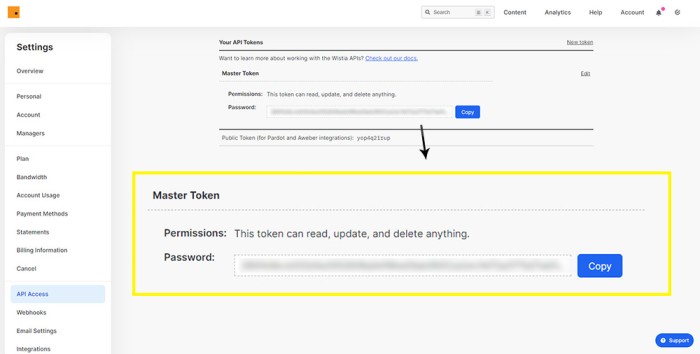
Pictured: You will find your Wistia API Key by following the Settings menu item in your Wistia dashboard (top-right), and then the 'API Access' in the left-solemn submenu. The token (or the 'Password' as named in Wistia) should be copied for inclusion in Yabber.
2. The API Key in Yabber
Copy the Wistia 'Password' into the API Key field in Yabber. Once done, click 'Save'. When you click save we'll validate the key and conduct an initial sync of your data.
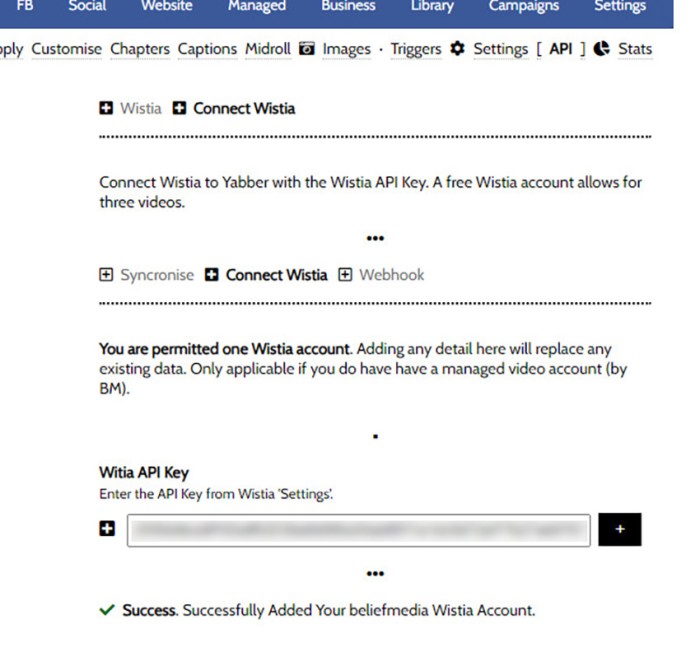
Pictured: Copy the Wistia 'Password' (Key) into the API Key field in Yabber. Once done, click 'Save'. When you click save we'll validate the key and conduct an initial sync of your data.
The connectivity allows us to retrieve data from Wistia, but we're required to set up a webhook in order for Yabber to receive real-time updates on all video interactions.
The required 'Webhook URL' and 'Secret' are created only once the API key is registered and validated.
3. The Webhook URL and Secret in Yabber
Once your API Key is validated, navigate your way to the 'Webhook' panel. If your API Key was successfully registered the URL and Secret fields should be populated with unique data. We will be required to copy this data into Wistia (the values are unique to you and should never be shared).
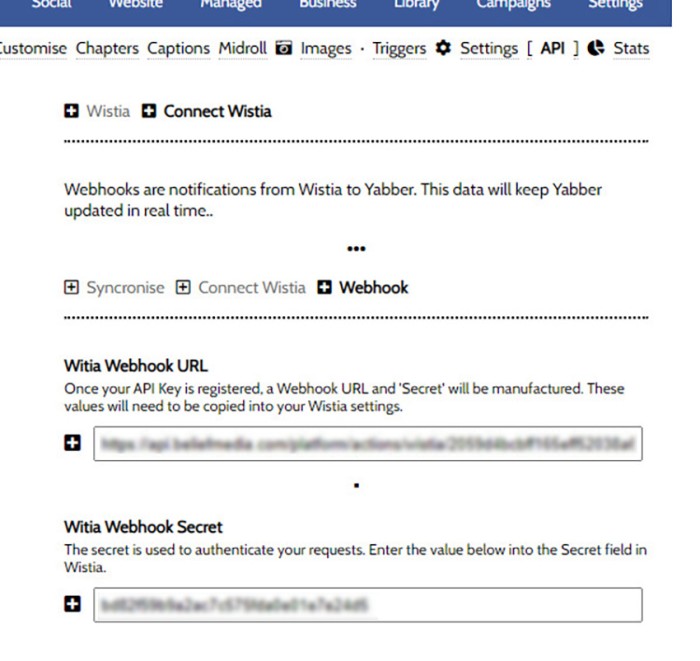
Pictured: Once your API Key is validated, navigate your way to the 'Webhook' panel. If your API Key was successfully registered the URL and Secret fields should be populated with unique data. We will be required to copy this data into Wistia (the values are unique to you and should never be shared).
4. The Webhook URL and Secret in Wistia
Once our API key is registered in Yabber, and the resulting Webhook URL and Secret are created, we can coy these values into Yabber. Select Wistia's 'Webhooks' menu from within the Settings panel, and copy the values into the fields as pictured.
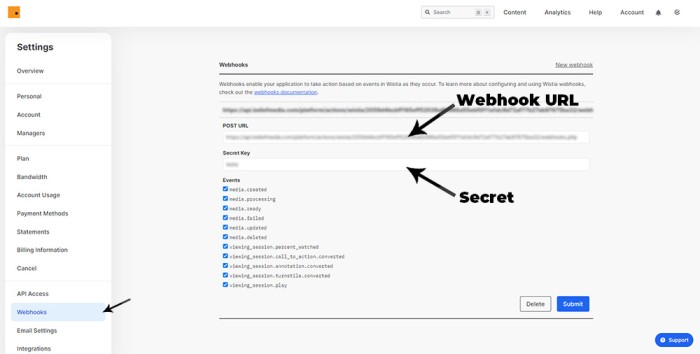
Pictured: Once our API key is registered in Yabber, and the resulting Webhook URL and Secret are created, we can coy these values into Yabber. Select Wistia's 'Webhooks' menu from within the Settings panel, and copy the values into the fields as pictured.
Select all the available 'Events'. Click 'Save'.
When these steps are completed, Yabber will be able to communicate with Wistia, and Wistia will provide notifications to Yabber of all video events in real time.
■ ■ ■
Related Wistia FAQs
Wistia is a third-party video hosting service that extends the marketing functionality of Yabber. Review selected related features bwlow.
Your website includes a very large number of methods to include different types of headings, including and (both of which serve a specific purpose), with other shortcode and Elementor tools making the addition of various 'headings' a piece of cake. While there are any number of ways to generate page titles, the 2015.3 website framework… [ Learn More ]
We've shared FAQs that showed you how to create Wistia video customisations, sharing profiles, turnstiles, and postroll CTA profiles (all linked below). This FAQ will show you how to update an individual video or all videos that are part of a project. You will find the facility to update videos and project videos by first… [ Learn More ]
Using Wistia’s Turnstile email collector, you can collect emails from within your videos at defined times, making it easy for you to gate content and drive warmer leads into a crafted pathway. The collected email is sent to Yabber and full automation may optionally be applied as if the user subscribed to a standard subscription… [ Learn More ]
A Wistia video may contain a share control button which presents various sharing options. Usage is generally discouraged because it tends to clutter the video container appearance, and other share options already exist. This FAQ will show you how to define various share options. You will find the Wistia share panels by first following the… [ Learn More ]
Wistia annotations are described as the 'polite marketers best friend'. Defined by you, the annotations are a small line of linked text that will render to the top right of your video container after a defined period of time, and for a period of time. Remember, the entire focus of a funnel is about creating… [ Learn More ]
A Postroll CTA is a customizable link (or full screen linked image) that shows at the end of your video that will help you get your viewers to take the next step in your conversion process. This FAQ will show you how to create and manage the Postroll feature. Since the profile is updated with… [ Learn More ]
Wistia Projects are parent container for videos that you can think of as categories, or folders on your PC. You might have a project for First Home Buyers, Refinancing, Investors, and so on. The projects are a good way of selectively sharing groups of videos (since each project has its own privacy settings), and you… [ Learn More ]
You may customise the appearance of a Wistia Video container by creating a profile in Yabber. Your 'style and feature' profile is then assigned to a single video or group of videos (in a project). Unlike services such as YouTube, Wistia allows you to alter virtually every element of the video container, from the colour… [ Learn More ]
Wistia is a third-party video hosting service that is tailored towards business in that it provides full tracking, detailed analytics, statistics, and full customisations - all of which Yabber supports. Another seriously significant advantage of Wistia is that is permits us to track usage to the user level, thus marrying up with our own methodology,… [ Learn More ]
Wistia is a third-party video hosting service that is tailored specifically to marketing efforts. The service charges a significant premium for hosting but they do provide a free option for three videos which we encourage you to use. You may register your free account at . This FAQ will show you how to connect Wistia… [ Learn More ]
In this FAQ we'll provide the basic shortcode necessary to return a video modal to your page. There are two methods for returning a video modal: a Yabber modal, and a full screen modal, with the former preferred because it is fully tracked and integrated with the . The Yabber modal is returned with the… [ Learn More ]
The 'Related Videos' panel will return a an accordion populated with related video modal links. The Relates Videos are managed in Yabber, so changes to the panel will be made on your website wherever the related series is shown. In order to use this tool, you must first connect YouTube and/or Wistia ( via the… [ Learn More ]
Related Video Blocks
Your website includes a large number of ways in which to return video, or assign video to certain hook on your website.
Your website includes a very large number of methods to include different types of headings, including and (both of which serve a specific purpose), with other shortcode and Elementor tools making the addition of various 'headings' a piece of cake. While there are any number of ways to generate page titles, the 2015.3 website framework… [ Learn More ]
We've shared FAQs that showed you how to create Wistia video customisations, sharing profiles, turnstiles, and postroll CTA profiles (all linked below). This FAQ will show you how to update an individual video or all videos that are part of a project. You will find the facility to update videos and project videos by first… [ Learn More ]
Using Wistia’s Turnstile email collector, you can collect emails from within your videos at defined times, making it easy for you to gate content and drive warmer leads into a crafted pathway. The collected email is sent to Yabber and full automation may optionally be applied as if the user subscribed to a standard subscription… [ Learn More ]
A Wistia video may contain a share control button which presents various sharing options. Usage is generally discouraged because it tends to clutter the video container appearance, and other share options already exist. This FAQ will show you how to define various share options. You will find the Wistia share panels by first following the… [ Learn More ]
Wistia annotations are described as the 'polite marketers best friend'. Defined by you, the annotations are a small line of linked text that will render to the top right of your video container after a defined period of time, and for a period of time. Remember, the entire focus of a funnel is about creating… [ Learn More ]
A Postroll CTA is a customizable link (or full screen linked image) that shows at the end of your video that will help you get your viewers to take the next step in your conversion process. This FAQ will show you how to create and manage the Postroll feature. Since the profile is updated with… [ Learn More ]
Wistia Projects are parent container for videos that you can think of as categories, or folders on your PC. You might have a project for First Home Buyers, Refinancing, Investors, and so on. The projects are a good way of selectively sharing groups of videos (since each project has its own privacy settings), and you… [ Learn More ]
You may customise the appearance of a Wistia Video container by creating a profile in Yabber. Your 'style and feature' profile is then assigned to a single video or group of videos (in a project). Unlike services such as YouTube, Wistia allows you to alter virtually every element of the video container, from the colour… [ Learn More ]
There may be occasions where you are required to give BeliefMedia access to your YouTube account. If you're a managed client, access will almost certainly be required. While Yabber provides facilities to upload YouTube videos and manage your channel, we may still require access in order to simultaneously add multiple videos without breaking any upload… [ Learn More ]
This FAQ will show you the method of sending images and/or video o Facebook Groups with Instagratify or Vista. The method is one that will become a global feature in the future, but until then, the Facebook Group feature will be a little different to other services. First, we only permit posting to your own… [ Learn More ]
Wistia is a third-party video hosting service that is tailored towards business in that it provides full tracking, detailed analytics, statistics, and full customisations - all of which Yabber supports. Another seriously significant advantage of Wistia is that is permits us to track usage to the user level, thus marrying up with our own methodology,… [ Learn More ]
YouTube Chapters are video chapters applied in YouTube under each video, and they're used on your website as a means for each user to navigate directly to that part of the video that is most relevant. From an SEO perspective, Google treats each chapter as an answer to a question, so the feature will improve… [ Learn More ]
You want those marketing assets on the periphery to property represent your brand, but you also want them to be consistent with your trending website traffic or consumer sentiment. For example, with the introduction of a FHB or Investor incentive of some kind you will likely want your broader marketing footprint to reflect this, or… [ Learn More ]
Evidenced by the large number of 'Related FAQs' shown at the bottom of this article, your website includes a very large number of video features. Why? Because video is vitally important... and given that it's a platform your competitors ignore, you have the capacity to achieve some amazing results. One of the many video features… [ Learn More ]
When you visit any YouTube channel you will be presented with a fairly typical layout. However, those playlists that are shown on your entry page, and the order in which they may be shown, may be customised to your liking in YouTube or in Yabber. This FAQ will show you how to customise your channel… [ Learn More ]
Wistia is a third-party video hosting service that is tailored specifically to marketing efforts. The service charges a significant premium for hosting but they do provide a free option for three videos which we encourage you to use. You may register your free account at . This FAQ will show you how to connect Wistia… [ Learn More ]
As with Social Media, it's rather absurd that we'll invest time, effort, and energy into creating video content and then let it rot away on a social platform that doesn't give it the exposure that the video deserves. For this reason, our website framework supports a full-featured video archive that'll show all your videos in… [ Learn More ]
At the risk of repeating ourselves, every single page on your website is a 'type' of landing page, and each and every page on your website is a conversion asset that must be treated as such. While the primary objective of each of your website pages might vary, the need to build every page around… [ Learn More ]
It's typical to change your social media banners of all types based on seasons, such as Christmas, Anzac Day, Easter or similar. A module in Yabber permits you to define start and stop dates for a specific banner, and that banner will automatically be applied (and later replaced with your 'default' banner). This FAQ shows… [ Learn More ]
The YouTube banner is the large image towards the top of your YouTube channel. Yabber provides a facility to update this banner, and this FAQ will show you how this is accomplished. Another FAQ will show you how to so it updates automatically on the basis of scheduled dates. For the purpose of the demonstration… [ Learn More ]
In this FAQ we'll provide the basic shortcode necessary to return a video modal to your page. There are two methods for returning a video modal: a Yabber modal, and a full screen modal, with the former preferred because it is fully tracked and integrated with the . The Yabber modal is returned with the… [ Learn More ]
In an FAQ titled we looked at how to assign videos to the and Pages on your website. Familiarity with the former module is required, as this FAQ will simply show you how to link directly to a video that was assigned to a specific lender in that modules. Confused yet? This feature is one… [ Learn More ]
In a previous FAQ we introduced how to define the single video for your website . However, this is the top-level that effectively acts as a conduit to the Lenders Archive Pages and the thousands of Lender Product Pages. Each of the specific Lender Archive Pages, and all of the pages associated with that lender,… [ Learn More ]
The Lender Archive Video is a shown on the entry . It is important for the purpose of amplifying funnel enthusiasm and introducing your website visitors to the purpose of the vast information archives you make available. The video should always include an appropriate call-to-action, appropriate disclaimers, and other helpful information. Remember, the primary purpose… [ Learn More ]
A YouTube Playlist is simply a collection of related videos. They may be shared as a group of videos on YouTube, or as it applies to your website, you may selectively include related videos in panels, video sliders, or in lists. Yabber provides a full-featured section to create, manage, and update playlists on YouTube (and… [ Learn More ]
As with the Yabber facility to add a video to the , the same method applies to standard blog posts. We know that video is the single page ingredient that'll attract and engage website users more than any other, so it stands to reason that we'll use it whenever and wherever we can. An article… [ Learn More ]
Yabber provides a large number of ways in which to send videos to Social, although it's more likely that you'll use the Outlook-based , or tools more often than any other, and both of these these tools will optionally applying a watermark, a heading, a music track, and fade effects. However, you may upload videos… [ Learn More ]
Given its importance, this FAQ is provided for clarification on how to ensure that Instagram videos are sent to YouTube via the Instagratify tool. If you haven't already, you should review 'general' the FAQ on , and another on . The reason a user might get confused by the integration is because the feature isn't… [ Learn More ]
Instagram accepts up to 9 images when creating a post. Instagratify has the capacity to stitch up these images into an animated GIF for sharing on social media or other purposes. When multiple images are required to be sent to social, the standard has generally since there's more options and the format is more widely… [ Learn More ]
We all know that Video is a highly effective marketing tool, and we all know that we should all be using it. Instagratify is designed to share those short and meaningful videos a super-simple process. Brokers have information fed to them via Lenders and aggregators every day, and you're exposed to new scarious and products… [ Learn More ]
The YouTube module is very extensive and permits a vast array of functions. This FAQ will show you how to change a featured 'Thumbnail' image for a YouTube video. For the purpose of the FAQ we'll assign a new Thumbnail to one of our boring videos. The thumbnail panel is located by following the small… [ Learn More ]
Video is the secret sauce that'll engage and convert your customers. Period. Our entire marketing effort once colder contact is made is predicated on the principles of 'Know, Like, and Trust', and these attributes are determined by our perceived Expertise and Authoritativeness, and there's no better way of developing an early relationship by way of… [ Learn More ]
The shortcode is now the primary method to render YouTube videos on your website. You should note that most video assignments on pages, FAQs, archive pages, and various other locations, are all managed via a point-and-click process, so the inclusion of videos other than these default 'hooked' locations requires use of the Elementor widget or… [ Learn More ]
The 'Related Videos' panel will return a an accordion populated with related video modal links. The Relates Videos are managed in Yabber, so changes to the panel will be made on your website wherever the related series is shown. In order to use this tool, you must first connect YouTube and/or Wistia ( via the… [ Learn More ]
We encourage multiple videos on your front page, and they should be presented in multiple ways. The front page video panel is shown (by default) at the bottom of your front page. However, the block may be moved if required, and it may be used anywhere with the use of shortcode. The result of the… [ Learn More ]
We encourage multiple videos on your front page, and they should be presented in multiple ways. The primary front page website video is shown fully rendered, and by default it'll show about half way down the front page. The result of the front page video is as you would expect (shown below). Not happy with… [ Learn More ]
Related Social Media FAQs
Yabber's Social Media modules are very extensive. Some of the social features, systems, and modules, are shown below.
You have a best interest duty requirement imposed upon you that essentially mandates you quickly communicate rate data to your clients - first when the board makes a cash rate decision, and then later when changes are made, or when repricing might be appropriate. Yabber provide a basic facility to create an RBA Cash Rate… [ Learn More ]
The Image Factory - part of the broader Media Factory which is closely connected to the Social Sendify module - is very much a legacy system, but it may still return content that might be of value on Social Media. Generative AI has diminished the value of the point-and-click tools we've used since 2007, so… [ Learn More ]
It is highly unlikely that you will be required to create your own Twitter X Application, but if you're no longer using Yabber, or you're creating your own application for any reason, or you're looking to increase your standard Twitter post allowance (the only platform where we throttle posts), then this FAQ will become relevant.… [ Learn More ]
We've shared FAQs that showed you how to create Wistia video customisations, sharing profiles, turnstiles, and postroll CTA profiles (all linked below). This FAQ will show you how to update an individual video or all videos that are part of a project. You will find the facility to update videos and project videos by first… [ Learn More ]
Using Wistia’s Turnstile email collector, you can collect emails from within your videos at defined times, making it easy for you to gate content and drive warmer leads into a crafted pathway. The collected email is sent to Yabber and full automation may optionally be applied as if the user subscribed to a standard subscription… [ Learn More ]
A Wistia video may contain a share control button which presents various sharing options. Usage is generally discouraged because it tends to clutter the video container appearance, and other share options already exist. This FAQ will show you how to define various share options. You will find the Wistia share panels by first following the… [ Learn More ]
Wistia annotations are described as the 'polite marketers best friend'. Defined by you, the annotations are a small line of linked text that will render to the top right of your video container after a defined period of time, and for a period of time. Remember, the entire focus of a funnel is about creating… [ Learn More ]
A Postroll CTA is a customizable link (or full screen linked image) that shows at the end of your video that will help you get your viewers to take the next step in your conversion process. This FAQ will show you how to create and manage the Postroll feature. Since the profile is updated with… [ Learn More ]
Wistia Projects are parent container for videos that you can think of as categories, or folders on your PC. You might have a project for First Home Buyers, Refinancing, Investors, and so on. The projects are a good way of selectively sharing groups of videos (since each project has its own privacy settings), and you… [ Learn More ]
You may customise the appearance of a Wistia Video container by creating a profile in Yabber. Your 'style and feature' profile is then assigned to a single video or group of videos (in a project). Unlike services such as YouTube, Wistia allows you to alter virtually every element of the video container, from the colour… [ Learn More ]
This FAQ will show you the method of sending images and/or video o Facebook Groups with Instagratify or Vista. The method is one that will become a global feature in the future, but until then, the Facebook Group feature will be a little different to other services. First, we only permit posting to your own… [ Learn More ]
Wistia is a third-party video hosting service that is tailored towards business in that it provides full tracking, detailed analytics, statistics, and full customisations - all of which Yabber supports. Another seriously significant advantage of Wistia is that is permits us to track usage to the user level, thus marrying up with our own methodology,… [ Learn More ]
YouTube Chapters are video chapters applied in YouTube under each video, and they're used on your website as a means for each user to navigate directly to that part of the video that is most relevant. From an SEO perspective, Google treats each chapter as an answer to a question, so the feature will improve… [ Learn More ]
You want those marketing assets on the periphery to property represent your brand, but you also want them to be consistent with your trending website traffic or consumer sentiment. For example, with the introduction of a FHB or Investor incentive of some kind you will likely want your broader marketing footprint to reflect this, or… [ Learn More ]
When you visit any YouTube channel you will be presented with a fairly typical layout. However, those playlists that are shown on your entry page, and the order in which they may be shown, may be customised to your liking in YouTube or in Yabber. This FAQ will show you how to customise your channel… [ Learn More ]
You want those marketing assets on the periphery to property represent your brand, but you also want them to be consistent with your trending website traffic or consumer sentiment. For example, with the introduction of a FHB or Investor incentive of some kind you will likely want your broader marketing footprint to reflect this, or… [ Learn More ]
It's typical to change your social media banners of all types based on seasons, such as Christmas, Anzac Day, Easter or similar. A module in Yabber permits you to define start and stop dates for a specific banner, and that banner will automatically be applied (and later replaced with your 'default' banner). This FAQ shows… [ Learn More ]
Yabber profiles a basic facility to update your Facebook page. Quite frankly, it's a very old module so doesn't include all the required fields that you would expect, so it'll see an update in the near future. You will find the Page options by following the 'FB' option in the primary menu (the Facebook Social… [ Learn More ]
This FAQ will guide you through the process of uploading and/or changing your Facebook profile image or company page banner. Note that two other similar FAQs are published with similar functionality. The first will show you how to , or those changes that will apply between a defined period of time, and the second will… [ Learn More ]
Wistia is a third-party video hosting service that is tailored specifically to marketing efforts. The service charges a significant premium for hosting but they do provide a free option for three videos which we encourage you to use. You may register your free account at . This FAQ will show you how to connect Wistia… [ Learn More ]
As with Social Media, it's rather absurd that we'll invest time, effort, and energy into creating video content and then let it rot away on a social platform that doesn't give it the exposure that the video deserves. For this reason, our website framework supports a full-featured video archive that'll show all your videos in… [ Learn More ]
There are social services that take great pride in providing an online calendar for the purpose of scheduling your social media. It's an acceptable option, but it's just another service that'll require a subscription, and it's just another service that'll keep your data once you leave. We've reinvented the method of sending content to social… [ Learn More ]
Your website is the epicentre of your marketing efforts, and it should link to and include those dynamic resources on the periphery, such as YouTube, Instagram, Facebook, and so on. This FAQ will show you how to include an Instagram Slider on your website using an Elementor widget and WordPress shortcode. All the attributes of… [ Learn More ]
It's typical to change your social media banners of all types based on seasons, such as Christmas, Anzac Day, Easter or similar. A module in Yabber permits you to define start and stop dates for a specific banner, and that banner will automatically be applied (and later replaced with your 'default' banner). This FAQ shows… [ Learn More ]
The YouTube banner is the large image towards the top of your YouTube channel. Yabber provides a facility to update this banner, and this FAQ will show you how this is accomplished. Another FAQ will show you how to so it updates automatically on the basis of scheduled dates. For the purpose of the demonstration… [ Learn More ]
A YouTube Playlist is simply a collection of related videos. They may be shared as a group of videos on YouTube, or as it applies to your website, you may selectively include related videos in panels, video sliders, or in lists. Yabber provides a full-featured section to create, manage, and update playlists on YouTube (and… [ Learn More ]
Yabber provides a large number of ways in which to send videos to Social, although it's more likely that you'll use the Outlook-based , or tools more often than any other, and both of these these tools will optionally applying a watermark, a heading, a music track, and fade effects. However, you may upload videos… [ Learn More ]
Given its importance, this FAQ is provided for clarification on how to ensure that Instagram videos are sent to YouTube via the Instagratify tool. If you haven't already, you should review 'general' the FAQ on , and another on . The reason a user might get confused by the integration is because the feature isn't… [ Learn More ]
The notion that you'll create social media content to various networks and effectively hand over ownership is a little absurd. All your social posts sent from any of our systems - such as Yabber, Instagratify, or Vista - are all optionally sent back to your website into a fully hashtag-searchable archive. This give your website… [ Learn More ]
Instagram accepts up to 9 images when creating a post. Instagratify has the capacity to stitch up these images into an animated GIF for sharing on social media or other purposes. When multiple images are required to be sent to social, the standard has generally since there's more options and the format is more widely… [ Learn More ]
We all know that Video is a highly effective marketing tool, and we all know that we should all be using it. Instagratify is designed to share those short and meaningful videos a super-simple process. Brokers have information fed to them via Lenders and aggregators every day, and you're exposed to new scarious and products… [ Learn More ]
Instagratify is a tool used to filter and send Instagram content to select social media networks based on the hashtag used in the Instagram post content. It is an excellent tool to use when out-and-about, and it'll likely become your default sharing tool when you're away from your standard Outlook calendar. Instagratify has a large… [ Learn More ]
The YouTube module is very extensive and permits a vast array of functions. This FAQ will show you how to change a featured 'Thumbnail' image for a YouTube video. For the purpose of the FAQ we'll assign a new Thumbnail to one of our boring videos. The thumbnail panel is located by following the small… [ Learn More ]
When Testimonials are received - regardless or whether of not they're - we will manufacture a suite of testimonial images that are suitable for social media. These images are all sent to your once created. The Vista assignment will be blank, meaning that they won't send to any social networks; you should review the images,… [ Learn More ]
The testimonial module is the most versatile in the finance (or any other) industry. We suggest you use it and take full advantage of the system. The Testimonial module will perform the following functions: Automatically pull reviews, testimonials, and recommendations from a growing list of services. The system will publish each review to all of… [ Learn More ]
The Sharebar is a menu of social platforms that floats on your page. It allows a user to share the current page to social media. The result of the Sharebar on our website is shown below. The Sharebar will only show on desktops. It will not show on mobile devices. To locate the Sharebar options,… [ Learn More ]
The Vista Social Media Calendar is an essential component of a number of social and managed programs. The calndar is a function of integration with Microsoft systems, and it enables a level of control and integration that will empower your business in ways that'll make your competitors fuzzy little heads explode. Important: Creating a calendar… [ Learn More ]
Connecting to Social Media is usually straight forward. Click on the icon that relates to the applicable social platform, assign the requested privileges, and you're done. However, we often assign a user to our Beta system that elevates the experience, but it also introduces a low level of complexity into the signup. Refer the following:… [ Learn More ]
In order to support a number of features, such as Google My Business, YouTube, Testimonials, and other tools, you must connect to Google. Navigate your way to the Social Connect panel in Yabber and click on the Google Icon. You will find the Google Connect button in Yabber by following the 'Connect' link in the… [ Learn More ]