In order to support a number of features, such as Google My Business, YouTube, Testimonials, and other tools, you must connect to Google. Navigate your way to the Social Connect panel in Yabber and click on the Google Icon.
Business Verification: In order for Testimonials to function, you must have your business verified with Google. This can take a couple of weeks, so perform the necessary actions as early as possible.
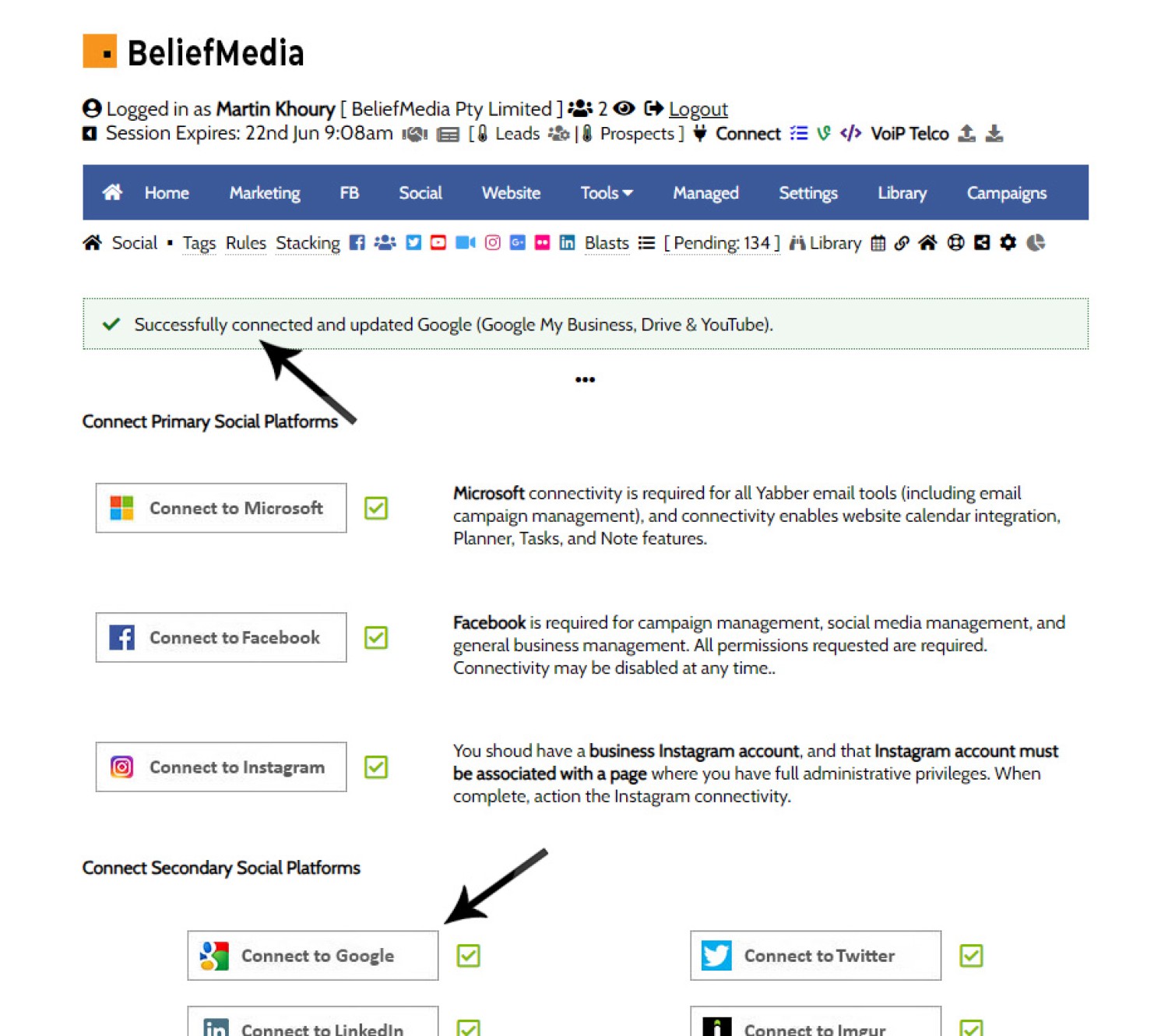
You will find the Google Connect button in Yabber by following the 'Connect' link in the header.
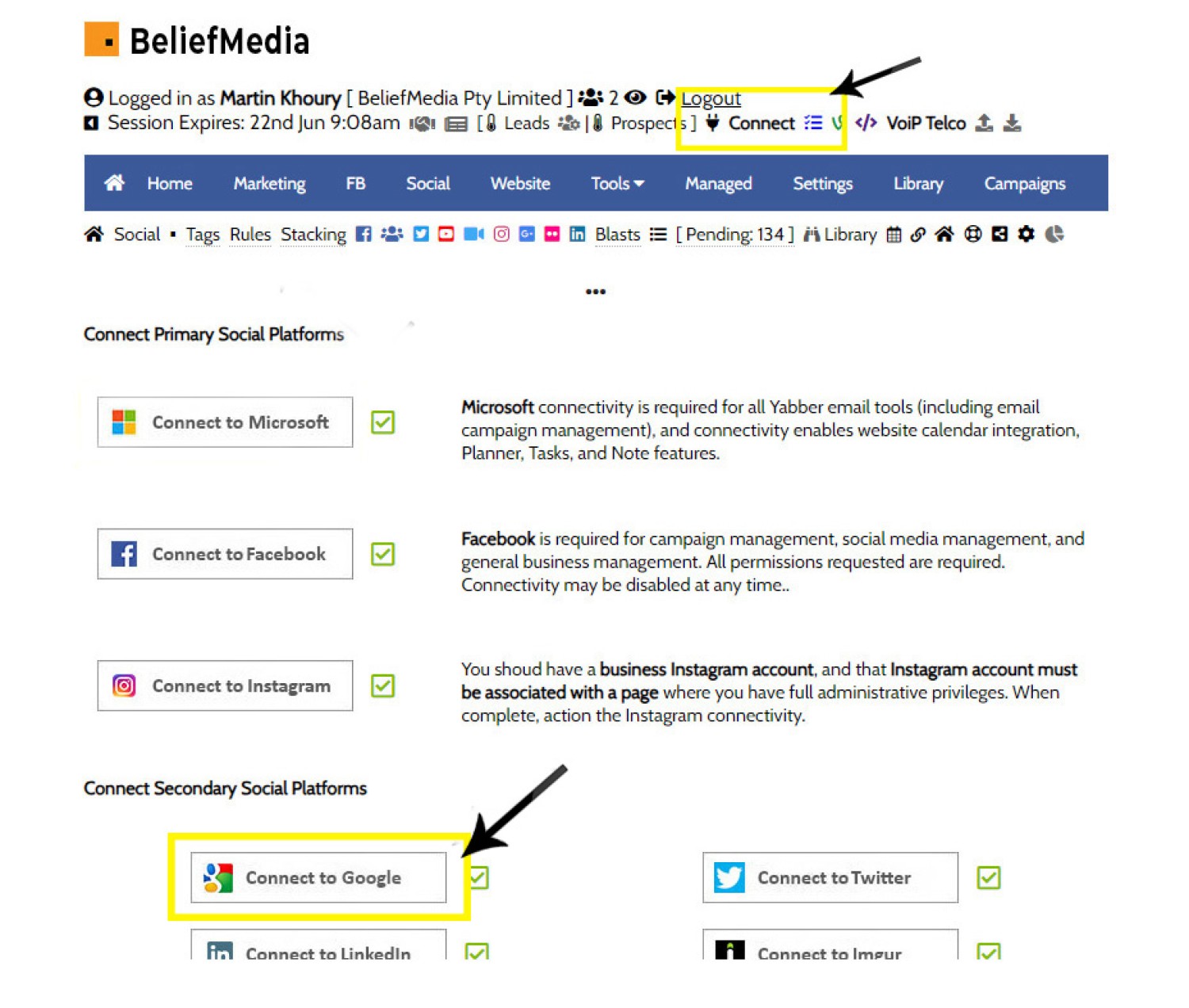
Pictured: You will find the Google Connect button in Yabber by following the 'Connect' link in the header. You will be required to accept all permission requests in order for Yabber to function effectively.
1. Connect to Google
Note that you must connect with the account used when you created your Google Business account, and you must select your Brand account (this is the account associated with YouTube).
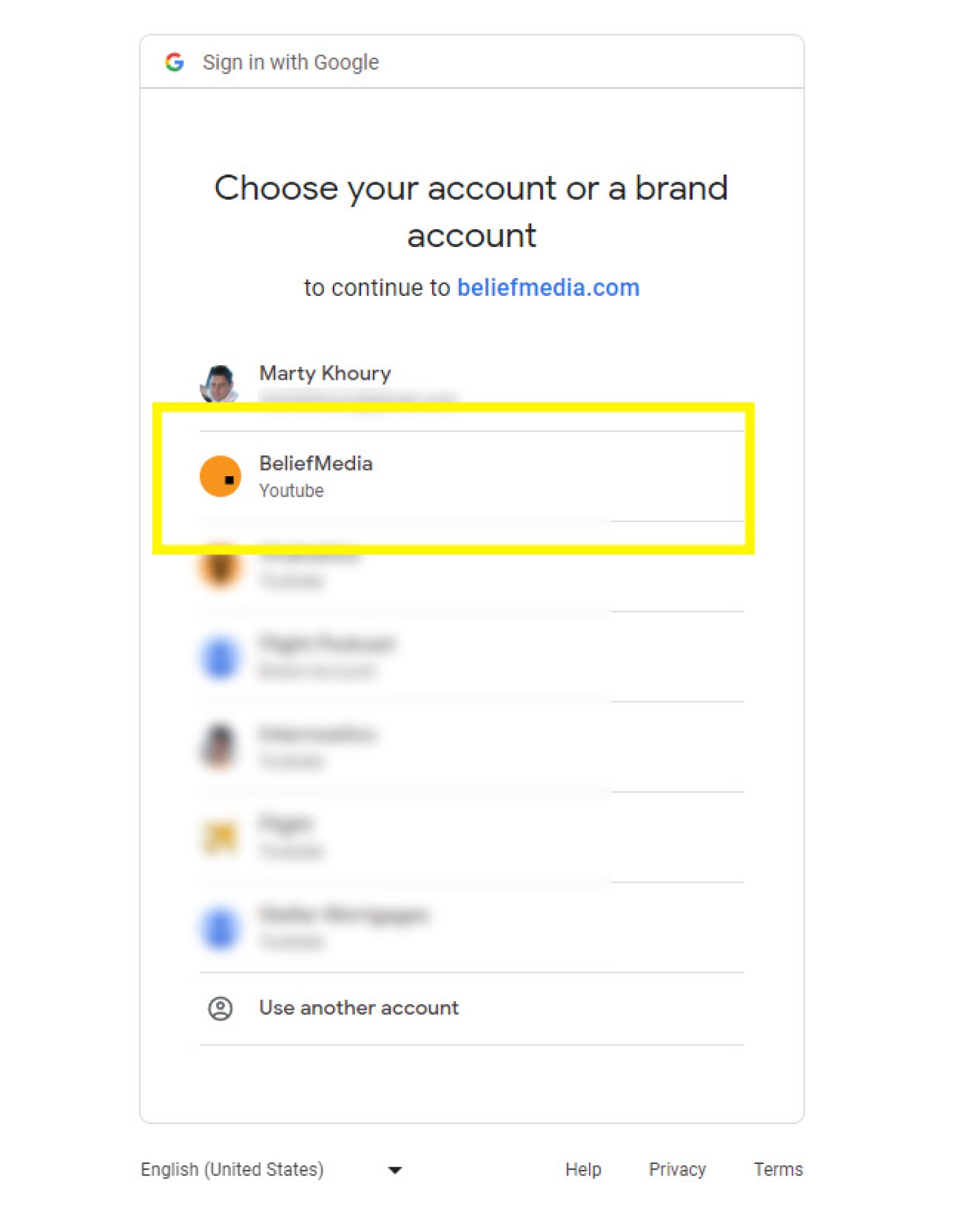
Select the applicable account.
2. Is Our Application Verified?
We make regular changes to our application so it morphs between verified and unverified. The application comes from us, so it is safe to use. You shouldn't connect to applications when you aren't familiar with the author or source.
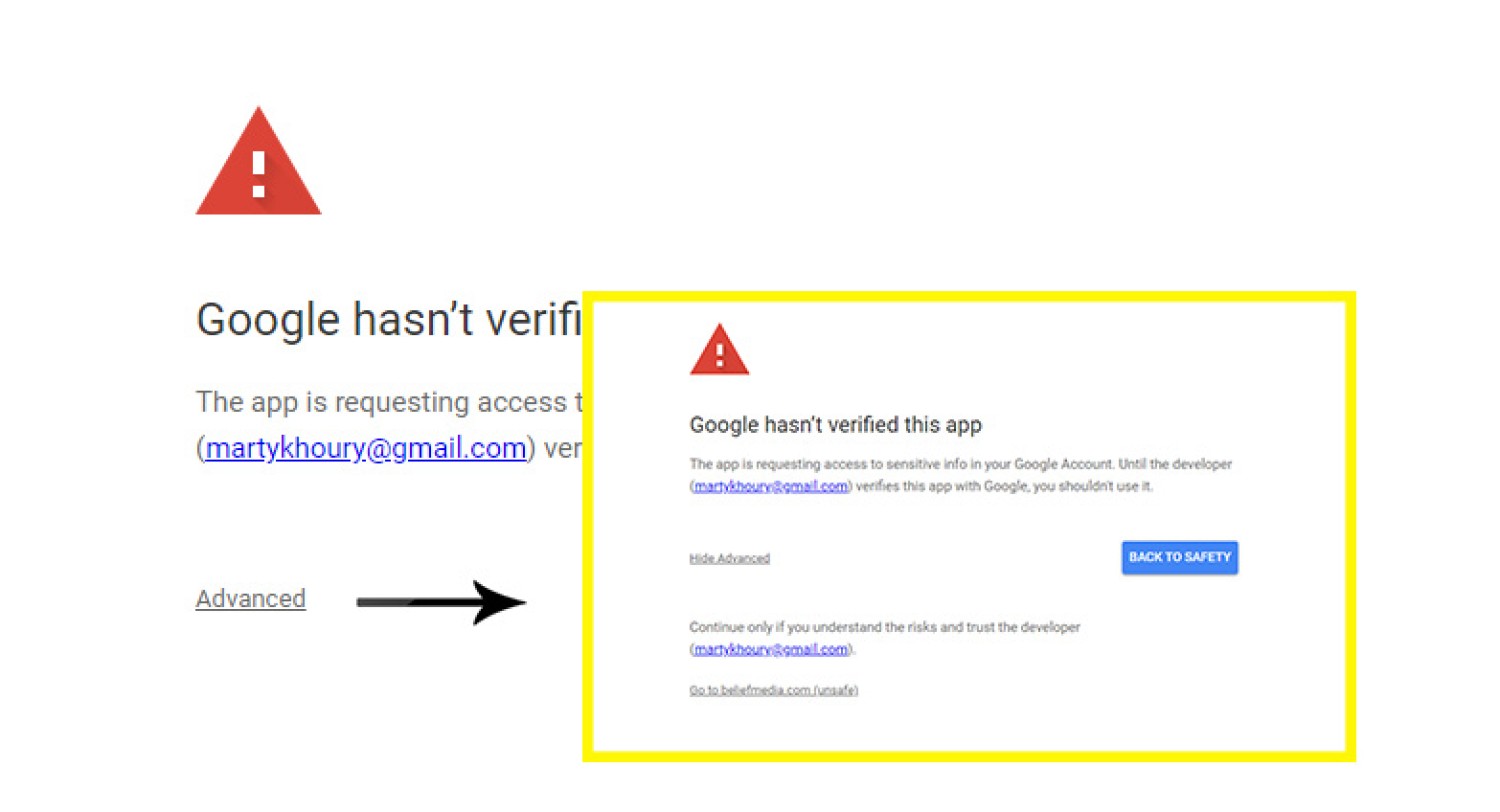
Pictured: If you encounter the 'Unverified' screen, click 'Advanced' and then 'Go to beliefmedia.com (unsafe)". It is safe - the application is only used by our clients.
3. Is Our Application Verified?
You are required to authorise all permissions in order for Yabber to perform all necessary tasks.
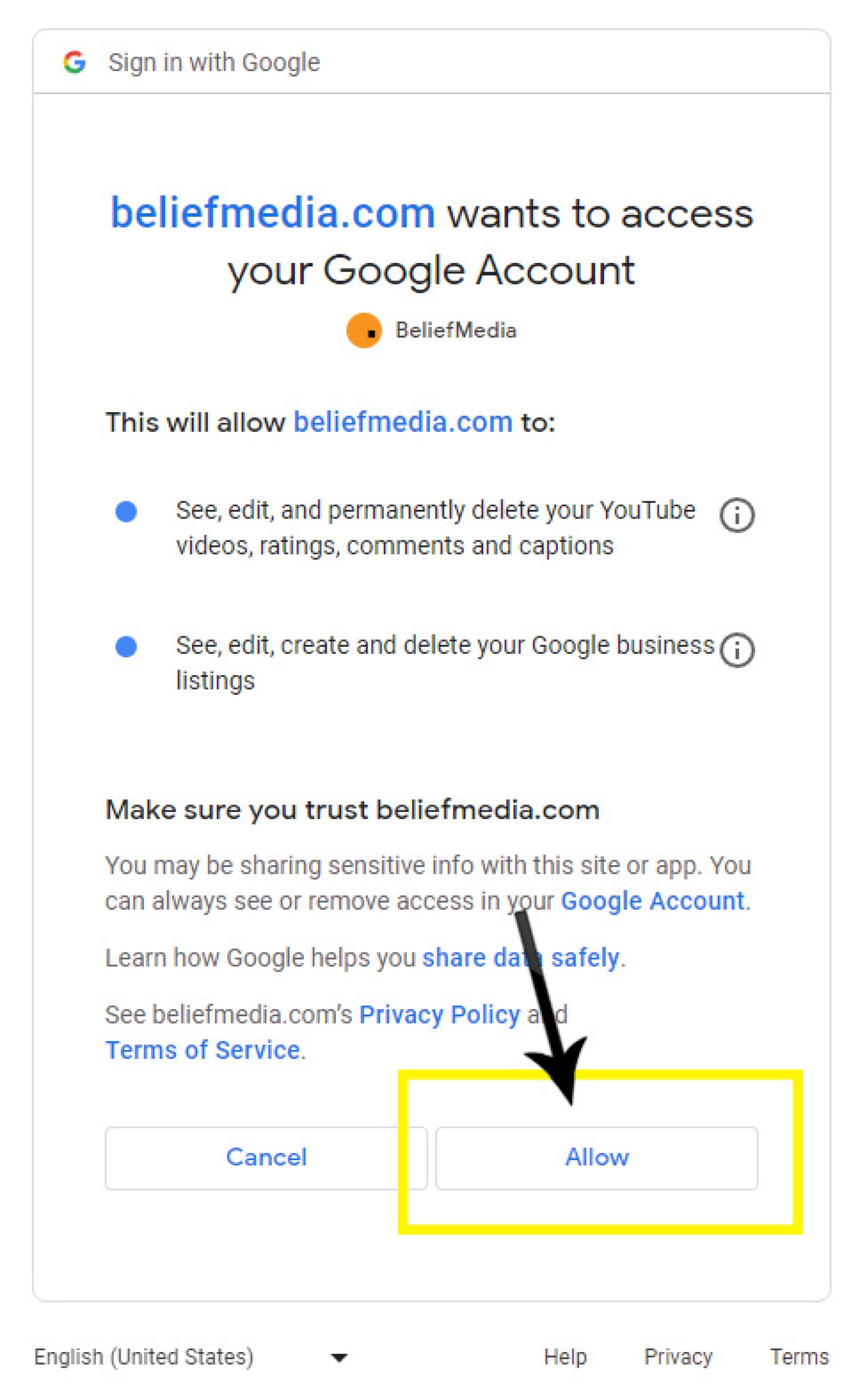
Click "Allow".
4. Yabber Connectivity
If the connection was successful, you will see a notification indicating as such (an error message returns a red message).
What Next?
If YouTube was connected successfully, your videos will start to be indexed, and daily statistics will be maintained (all other YouTube functions are avaialble). Google My Business will be connected and Testimonials will be available via the Testimonials module.
Related FAQs
Related FAQs and features.
Your website includes a very large number of methods to include different types of headings, including and (both of which serve a specific purpose), with other shortcode and Elementor tools making the addition of various 'headings' a piece of cake. While there are any number of ways to generate page titles, the 2015.3 website framework… [ Learn More ]
It is highly unlikely that you will be required to create your own Twitter X Application, but if you're no longer using Yabber, or you're creating your own application for any reason, or you're looking to increase your standard Twitter post allowance (the only platform where we throttle posts), then this FAQ will become relevant.… [ Learn More ]
Microsoft Azure is described as "an ever-expanding set of cloud services to help your organisation meet your business challenges. It is the freedom to build, manage and deploy applications on a massive, global network using your favourite tools and frameworks." So, Azure is a cloud-based hosting and application backend that supports small business through to… [ Learn More ]
There may be occasions where you are required to give BeliefMedia access to your YouTube account. If you're a managed client, access will almost certainly be required. While Yabber provides facilities to upload YouTube videos and manage your channel, we may still require access in order to simultaneously add multiple videos without breaking any upload… [ Learn More ]
YouTube Chapters are video chapters applied in YouTube under each video, and they're used on your website as a means for each user to navigate directly to that part of the video that is most relevant. From an SEO perspective, Google treats each chapter as an answer to a question, so the feature will improve… [ Learn More ]
You want those marketing assets on the periphery to property represent your brand, but you also want them to be consistent with your trending website traffic or consumer sentiment. For example, with the introduction of a FHB or Investor incentive of some kind you will likely want your broader marketing footprint to reflect this, or… [ Learn More ]
When you visit any YouTube channel you will be presented with a fairly typical layout. However, those playlists that are shown on your entry page, and the order in which they may be shown, may be customised to your liking in YouTube or in Yabber. This FAQ will show you how to customise your channel… [ Learn More ]
It's typical to change your social media banners of all types based on seasons, such as Christmas, Anzac Day, Easter or similar. A module in Yabber permits you to define start and stop dates for a specific banner, and that banner will automatically be applied (and later replaced with your 'default' banner). This FAQ shows… [ Learn More ]
The YouTube banner is the large image towards the top of your YouTube channel. Yabber provides a facility to update this banner, and this FAQ will show you how this is accomplished. Another FAQ will show you how to so it updates automatically on the basis of scheduled dates. For the purpose of the demonstration… [ Learn More ]
In this FAQ we'll provide the basic shortcode necessary to return a video modal to your page. There are two methods for returning a video modal: a Yabber modal, and a full screen modal, with the former preferred because it is fully tracked and integrated with the . The Yabber modal is returned with the… [ Learn More ]
A YouTube Playlist is simply a collection of related videos. They may be shared as a group of videos on YouTube, or as it applies to your website, you may selectively include related videos in panels, video sliders, or in lists. Yabber provides a full-featured section to create, manage, and update playlists on YouTube (and… [ Learn More ]
Yabber provides a large number of ways in which to send videos to Social, although it's more likely that you'll use the Outlook-based , or tools more often than any other, and both of these these tools will optionally applying a watermark, a heading, a music track, and fade effects. However, you may upload videos… [ Learn More ]
Given its importance, this FAQ is provided for clarification on how to ensure that Instagram videos are sent to YouTube via the Instagratify tool. If you haven't already, you should review 'general' the FAQ on , and another on . The reason a user might get confused by the integration is because the feature isn't… [ Learn More ]
The YouTube module is very extensive and permits a vast array of functions. This FAQ will show you how to change a featured 'Thumbnail' image for a YouTube video. For the purpose of the FAQ we'll assign a new Thumbnail to one of our boring videos. The thumbnail panel is located by following the small… [ Learn More ]
Google Analytics is a platform that collects data from your websites and apps to create reports that provide insights into your business. is a system that measures actions on your website (by way of 'Triggers') and associates variables with that action. Note that Yabber has always provided the facilities that Google Tag Manager now provides… [ Learn More ]
The shortcode is now the primary method to render YouTube videos on your website. You should note that most video assignments on pages, FAQs, archive pages, and various other locations, are all managed via a point-and-click process, so the inclusion of videos other than these default 'hooked' locations requires use of the Elementor widget or… [ Learn More ]
The 'Related Videos' panel will return a an accordion populated with related video modal links. The Relates Videos are managed in Yabber, so changes to the panel will be made on your website wherever the related series is shown. In order to use this tool, you must first connect YouTube and/or Wistia ( via the… [ Learn More ]
The Vista Social Media Calendar is an essential component of a number of social and managed programs. The calndar is a function of integration with Microsoft systems, and it enables a level of control and integration that will empower your business in ways that'll make your competitors fuzzy little heads explode. Important: Creating a calendar… [ Learn More ]
When a website is delivered to you, the connectivity is established and the website will be partially customised. There may be times where you'll be required to add a new website to Yabber to enable the vast number of features. Yabber is a multi-website system that supports any number of your own (or child) websites.… [ Learn More ]
Connecting to Social Media is usually straight forward. Click on the icon that relates to the applicable social platform, assign the requested privileges, and you're done. However, we often assign a user to our Beta system that elevates the experience, but it also introduces a low level of complexity into the signup. Refer the following:… [ Learn More ]
In order to support a number of features, such as Google My Business, YouTube, Testimonials, and other tools, you must connect to Google. Navigate your way to the Social Connect panel in Yabber and click on the Google Icon. You will find the Google Connect button in Yabber by following the 'Connect' link in the… [ Learn More ]
If you are asked to assign access to your Facebook Ad account, you should complete the following steps. Note that managed clients do not need to update as described - all advertising management is hosted locally (and created) in Yabber. Note that Facebook changes its workflow often. What is pictured may not match the screen… [ Learn More ]
The Primary method of driving the hashtag-based Instagram to Social Media tool (Instagratify), we must have a single authoritative Instagram account set up as a business account and connected to your primary Facebook page. This FAQ will guide you through a few of the steps that are necessary. However, the process is reasonably intuitive, so… [ Learn More ]
Related Website Social Articles
Related website articles. See the blog for all relevant post categories - related articles below are limited to Google and YouTube articles.
We've recently updated the 'Testimonials' website and Yabber module, and the changes are significant enough that they require a reintroduction to the feature. Some like reviews. Others don't. We don't. In the broking world, however, and in the broader finance space in particular, reviews serve a valid purposes, and in a world populated with copious… [ Learn More ]
We've written a large number of YouTube shortcodes over the years, but as WordPress and YouTube have evolved, and as we've added more features to Yabber and our , some of our have become partially obsolete, and the functionality in some of those tools fail to take advantage of the… [ Learn More ]
We've created a large number of sliders recently that replace various legacy website features. The slider introduced in this article show selected post type content as sliding panels. The feature may be used anywhere with a drag and drop Elementor widget or shortcode, with the expectation that it will be used on the front page… [ Learn More ]
We recently updated the Reviews module on our . The module takes full advantage of Yabber's automation, and the system seamlessly integrates with the Elementor framework that is the backbone of our website architecture. The former Reviews module wasn't nearly as robust as required, and it only provided for a shortcode option… [ Learn More ]
Brokers are attracted to us because we provide a solid, entirely future-proof, and scalable digital foundation to their business that returns more conversions. It doesn't matter if your efforts are directed at marketing, , or , our totally are designed to work in company to provide a better… [ Learn More ]
If your business actively engages with digital marketing of any kind you should be using UTM tracking codes in all the URLs associated with all your online campaigns. This article details what UTM tracking codes are, how they're used, and how they integrate with our . The UTM tags as discussed in… [ Learn More ]
We believe that the tool we're introducing in this article is one of the most powerful and versatile social media scheduling tools ever made available to businesses. In company with our toolkit, services, features, , and broad , Vista provides the… [ Learn More ]
Instagratify is an Instagram=based social media tool that distributes your Instagram posts, albums, and video content (in a variety of formats) to various social networks based on the hashtags in the Instagram post. The tool is just one part of our social media toolkit but it's the one feature used more often than any other,… [ Learn More ]
In a previous article we introduced a feature that will and other assets based on set-and-forget events that you have defined throughout the year. In the same article we touched on the automated changes that may be made to the same assets based on predictive or trending consumer… [ Learn More ]
In an article that introduces Yabber's broad we touch on social media 'Blasts'. Typically used by franchises, aggregators, or businesses with a large number of social media accounts, the blasts will send the same message to multiple social accounts with altered text by way of placeholders. This article introduces the feature… [ Learn More ]
We've always provided a facility to set a schedule of profiles based on national or important events, such as Anzac Day, Australia Day, Christmas, or various company events. This article introduces the enhanced functionality we've built into which is more powerful than any product we've ever provided in the past.… [ Learn More ]
supports a large number of general social features that are introduced by way of a more detailed article titled "". In that article we take a helicopter view and try to trim down the vast ocean of social features into a narrative that doesn't… [ Learn More ]
Adding video chapters to a video on your website is a guaranteed method to improve upon your views and engagement. Many of our own videos are hours in length, so incorporating clickable chapter links enables a user to jump ahead to that part of a video that interests them… [ Learn More ]
As introduced in our article, "", we introduce why there's no greater asset to your and funnel experience than the of and . In a world where we want people to 'know us and like us', video provides the… [ Learn More ]
Following on from our dealing with creating a YouTube tower with the YouTube RSS feed and WordPress shortcode, this article seeks to provide guidance when building your own tower or thumbnail gallery via use of YouTube's (version 3) API. Given the numerous options that might apply, we've provided a fairly generic example… [ Learn More ]
This article will show you how to display YouTube thumbnail links in your WordPress website (or PHP application) by way of the video RSS feed. While another article is that'll display the same output using the YouTube API, the RSS method navigates the requirement to register for the API, making the process a… [ Learn More ]
This article provides the necessary code to render YouTube video views, titles, descriptions, likes, dislikes, and other data into your WordPress website or PHP application with shortcode. The functions require that you register for an API key via Google's . Both the WordPress and PHP function share a single function that makes the… [ Learn More ]
This is the first of a couple of a few articles that'll deal with obtaining data from (version 3). This post will show you how to use YouTube API to render a viewcount (of total videos), subscriber count, and video count in your WordPress post or page with shortcode, or in a… [ Learn More ]
The YouTube Subscribe button shortcode permits you to embed a channel subscription button into your WordPress post or page with shortcode. The button is another good argument for shortcode over code snippets provided by online tools; if the YouTube embed code ever changes, or new features were added, or you simply wanted to alter its… [ Learn More ]
While YouTube does makes it simple to embed a video into your website, the method doesn't come without its disadvantages - styles and features are limited, scalability isn't enabled by default, and changing site-wide occurrences of video presentations is problematic. This article introduces a WordPress shortcode that'll permit you to include single videos and playlists… [ Learn More ]