Conditional Content is one of the defining features of your website framework. Despite the fact the Conditional Content blocks are often avoided because of the perceived complexity, they seriously amplify the effectiveness of any organic or promoted funnel. We appreciate that many brokers just 'want a website', and that's find, but if and when the time comes to improve upon its effectiveness, the framework we've built is unquestionably the most powerful in the industry, and it will support whatever requirement you throw at it.
An understanding of Interest Types is required before engaging with Conditional Content Blocks. The content shown to a user in any Block is resolved on the basis of the interest score for each specific website user, so your website will shape itself around each and every user.
The basic method of creating blocks is detailed in an FAQ titled "Creating Basic Website Blocks and Returning Content with Elementor or Shortcode. This FAQ will only look at the Conditional aspects of each block.
Conditional Content and Blocks are a Big Topic
Conditional Content and Conditional Blocks are a big topic. The FAQ providing an introduction to Conditional Content should be referenced for a better understanding of our conditional methods, and there's an FAQ that details the basic usage of Blocks. In essence, Conditional Content is a means to show different content to different users based on their resolved borrowing objective, occupation, or interest type -- It is an extremely powerful feature. Blocks may be used in the same way, but their primary purpose is to manufacture Blocks of content that are 'recycled' on your website in multiple locations (allowing a global update with a single edit).
Anything Conditional is an advanced topic, but if you have the resources to assign effort into these modules, and you have the necessary website traffic to justify the time, you will invariably see far better results. All marketing - and your nurturing marketing funnels in particular - is predicated on relevance, and conditional content serves this primary funnel objective.
Example Block: It's worth noting that the paragraphs above will likely be repeated in multiple FAQs, and they will required ongoing edits as more resources are created. As such, this entire block of text (including the title) was created as a block  .
.
Categories and Interest Tags
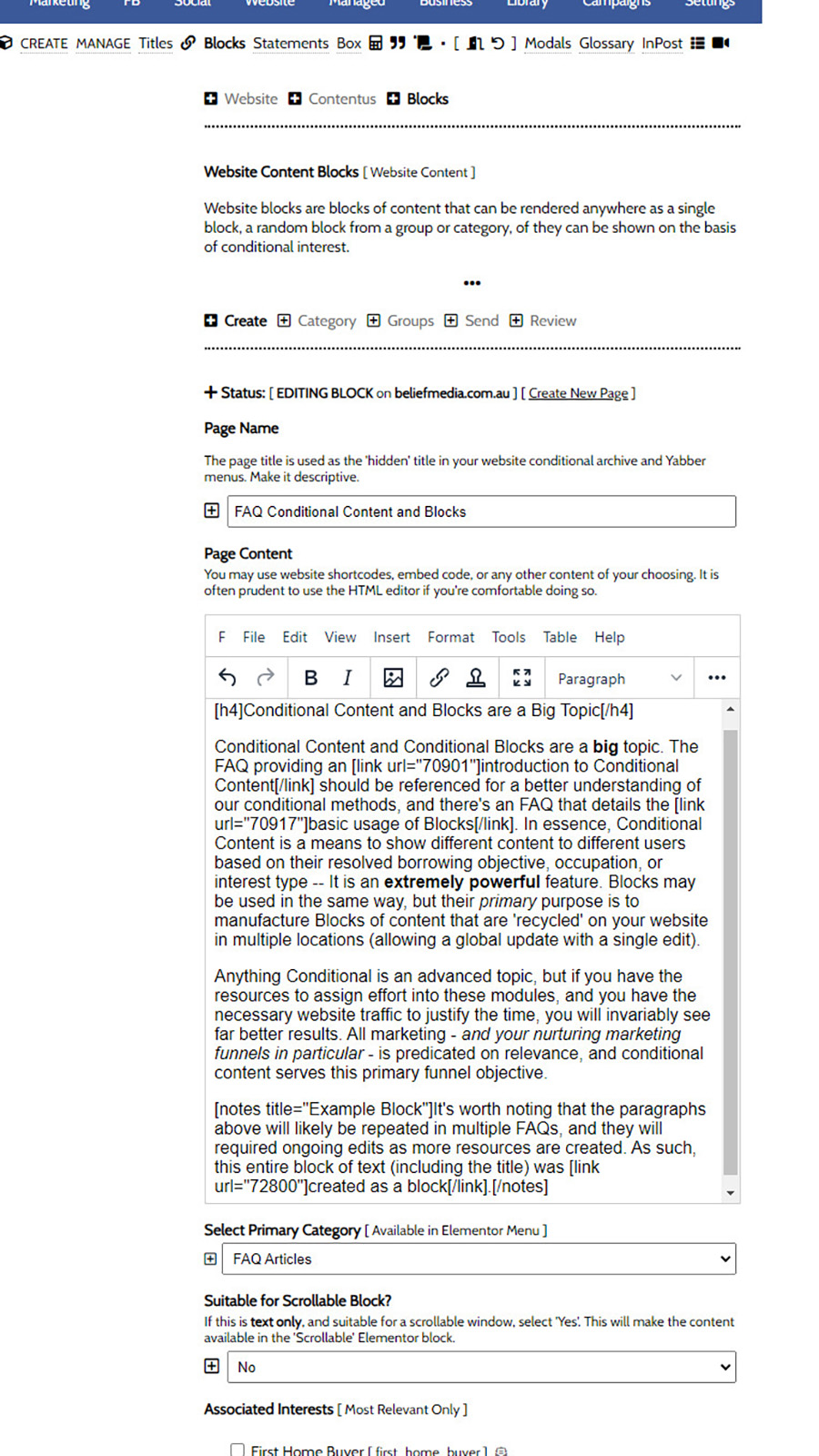
First, you may access the Blocks module by following the 'Contentus' icon in the 'Website' module. Select the 'Blocks' submenu item to return block options. Despite the module providing extensive conditional features, it's not given home in the Conditional module because the primary reason the feature is used is to create general website content - not conditional content.
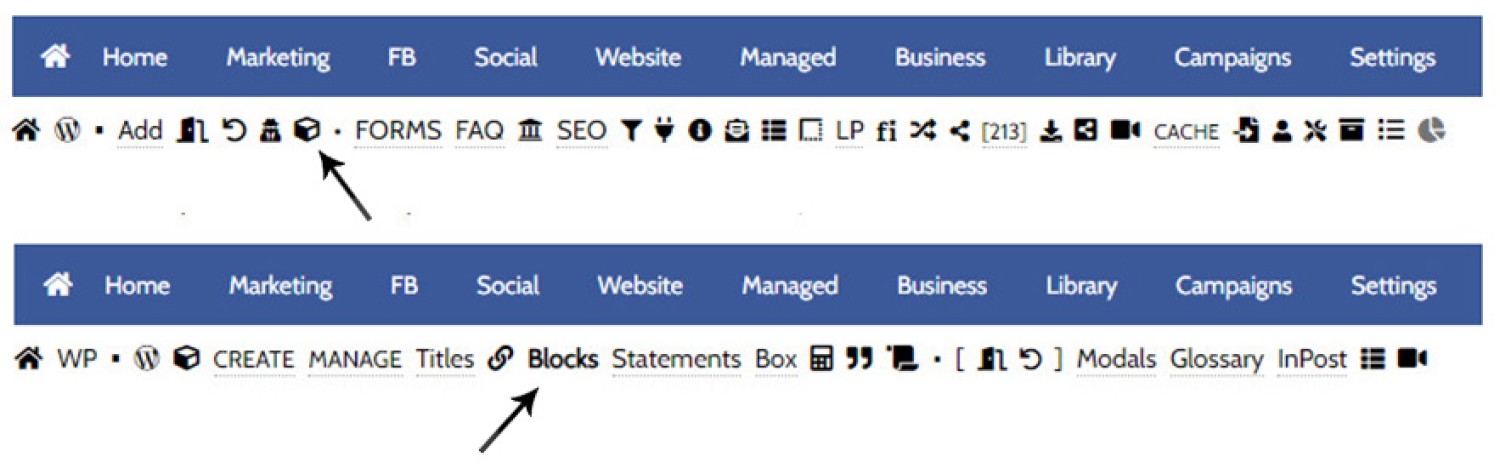
Pictured: First, you may access the Blocks module by following the 'Contentus' icon in the 'Website' module. Select the 'Blocks' submenu item to return block options.
The focus of the Resolved Content Block as introduced in this FAQ is on categories - not tags. The Interest tags are generally used by other Block features.
Conditional and Fixed Block Types
A number of block types are available that will return your content in various ways. Some block types are fixed in that they show a specific block and nothing more. Others will resolved based on interest or other identified attributes. Block types are generally as follows (the leading text is the type attribute used in shortcode):
- block - this is the default method. It is used to return a single block with no conditional resolution applied.
- category - used when returning a block on the basis of its assigned category.
- group - used when returning a block based its assigned group.
- interest - used when returning a block based on a resolved and specific interest type (or a random block assigned to a single interest).
- resolved - used when returning content based on the resolved interest type. The resolved content is on the basis of category - not interest.
For this FAQ we're going to use the resolved block type.
The Resolved Content Block and Shortcode
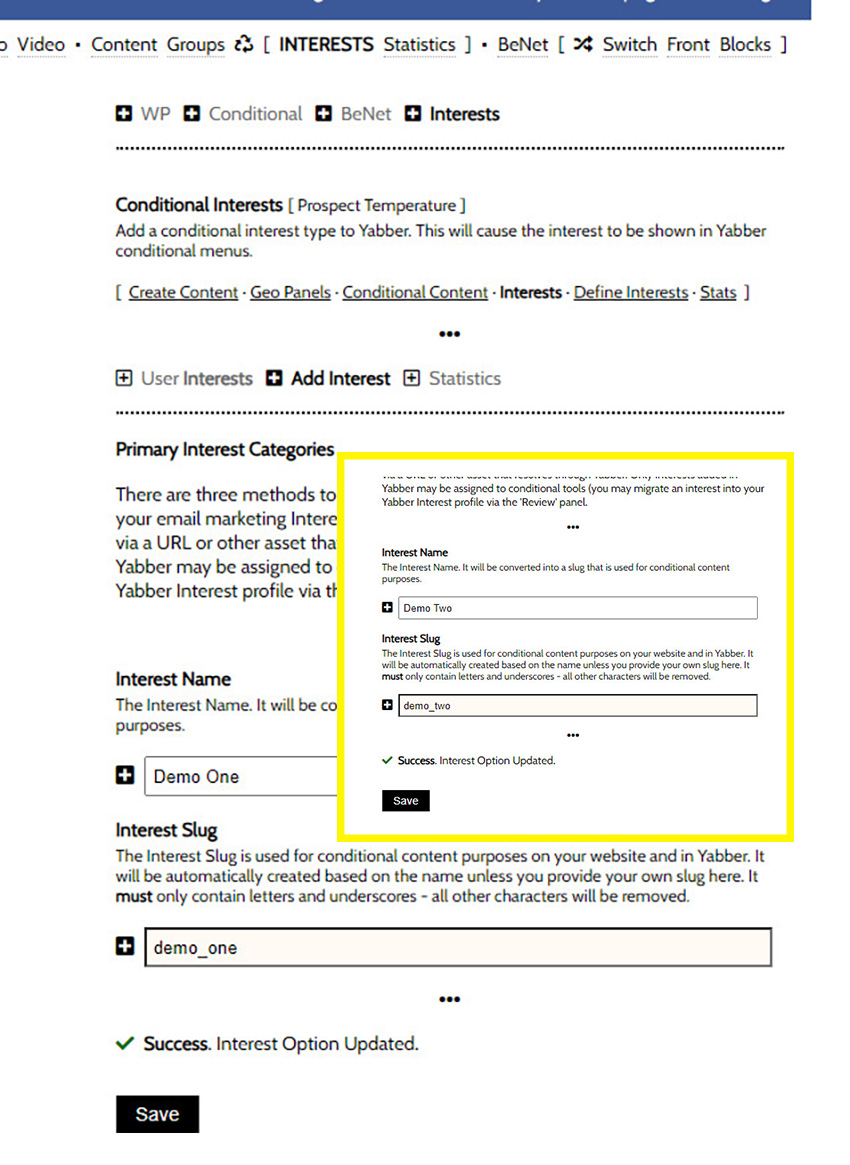
Our initial objective is to create a block of content that will be returned to a user when they're resolved to the 'Demo One' category. This would normally be 'First Home Buyer' or something similar - we're obviously using 'Demo One' (demo_one) for the purpose of the demonstration. A category is just a single interest, but it's considered a parent interest in the world of blocks, and the category is used by the primary Elementor widget (and shortcode) to return conditional content.
Demo Interests: For the purpose of our demonstration, we've created two interests in Yabber as 'Demo One' and 'Demo Two'. In reality, these interests would be placeholders for real interest types, such as 'First Home Buyer' and 'Refinancing'. Not all interests are Block categories (because not all of them are important enough), so the Category must be explicitly created.
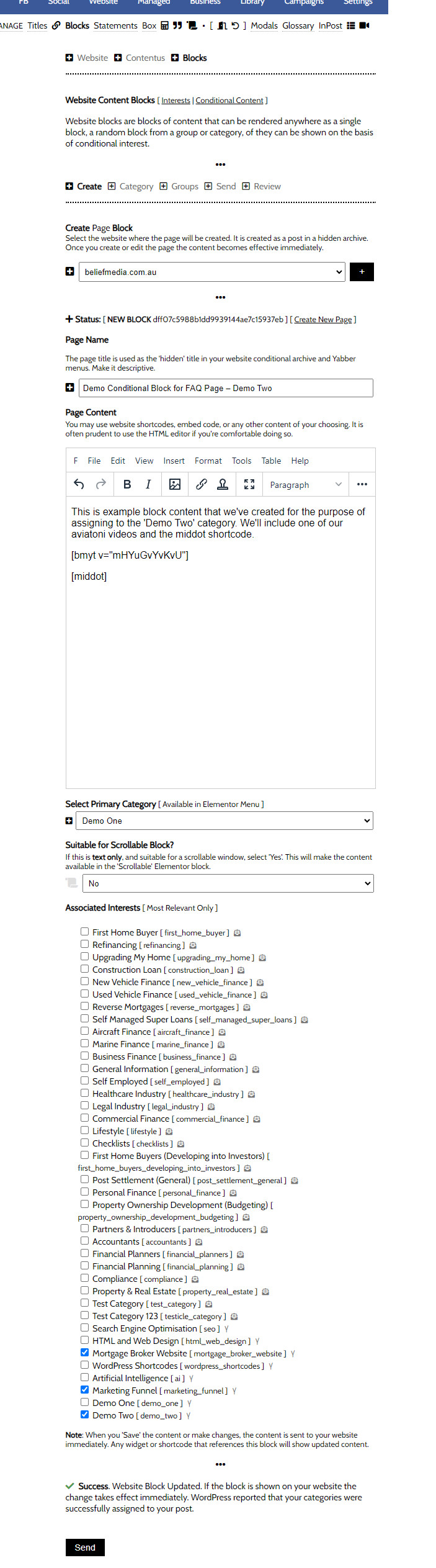
We'll go ahead and create a Conditional Block, or one that will be shown when the user is resolved to the 'demo_one' interest category (the interest tags are used for other block types). Again, we have assigned this specific block to the 'Demo One' category, and we have also assigned it to various interest tags. For the purpose of primary resolved conditional content, the interest tags are ignored.

Pictured: We'll go ahead and create a Conditional Block, or one that will be shown when the user is resolved to the 'demo_one' interest category (the interest tags are used for other block types). Again, we have assigned this specific block to the 'Demo One' category, and we have also assigned it to various interest tags. For the purpose of primary resolved conditional content, the interest tags are ignored.
Note that the 'Demo One' category is highlighted (recognised as an interest in Yabber and your website by way of the demo_one tag). This block of content will be shown when the demo_one interest type is resolved by way of your website or Yabber.
Because we want to demo how to show content on the basis of multiple interests (in our case, demo_one and demo_two), I'll go a ahead and create a second block of content that I'll assign to the Demo Two (demo_two) category.
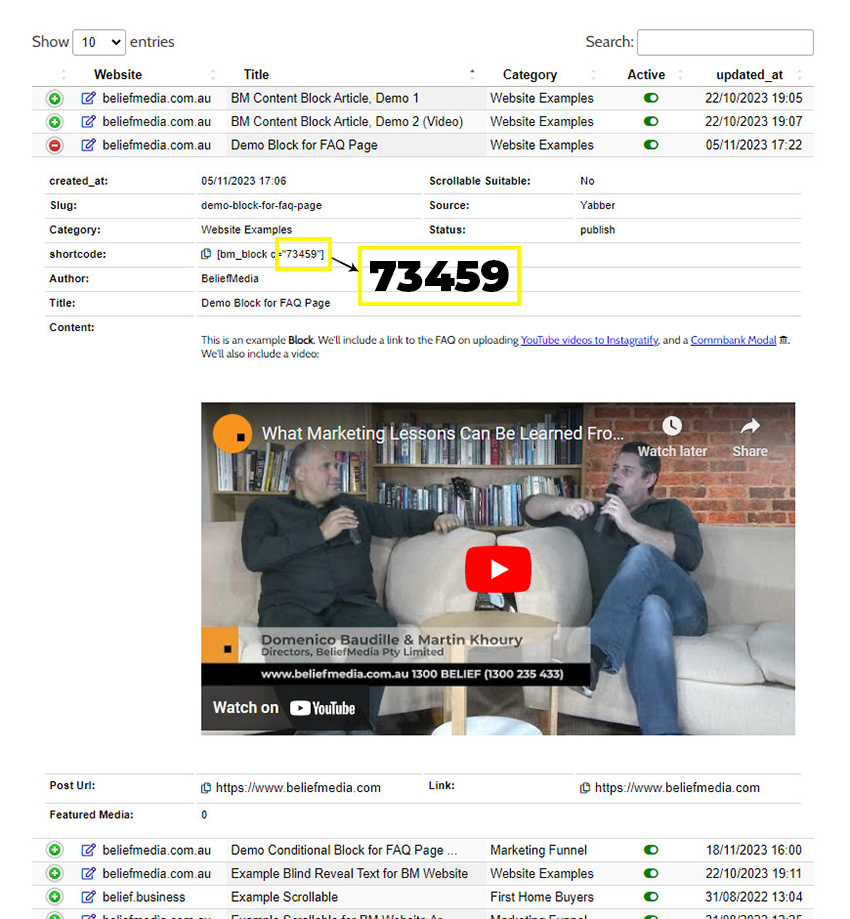
While it's normal to build your content with the drag-and-drop Elementor widget, we'll look at a shortcode example. The format of the resolved shortcode is as follows: [bm_block type="resolved" default="73459"]. In this case, the type is resolved (meaning that block content should served to a user when user objectives are identified), and we've also defined our default block, or the block that will show when interest cannot be resolved, or when there's no content to show for the resolved interest (in our case, a Block with an ID of 73459 was chosen to show by default).
Now, we've only created two blocks for the purpose of this example, but it's highly likely that all the other examples on this website will interfere with the result... and this is both expected and further indication of how effective the system functions. However, in order to force content to show, we'll assign very high interest scores (this is the content you're meant to see ).
To make it very clear what the conditional content block is we'll apply a small left border to the content.
Whatever content it is you're seeing below, we'll force a change by way of a [link url="73446" interest="demo_one" rs="30000"]this link[/link] (discussed in another article), so go ahead and click on this link and scroll back to the conditional content shown below (which should resolve to the demo_one content). We'll do the same thing to try and force demo_two content, so click on this link and the content will swap again (if it doesn't, check your interest scores below - we'll always resolve to the interest with highest score).
This is an example Block. We'll include a link to the FAQ on uploading YouTube videos to Instagratify, and a Commbank Modal . We'll also include a video:
FYI, your interest scores are shown below. You will see how we've forced our demo interests in order to force our demo content.
Not Available.
What we're just demonstrated is an extremely powerful feature. The funnel is a two-way conversation, and the conditional content permits your website to respond to the user in a way that maintains relevance, and relevance is the key to conversions.
You will want to create categories for all your primary borrowing types, and assign one or more pieces of content to those categories. The content served to each resolved category is selected at random from a pool of options and this is done to split-test the effectiveness of content blocks - another seriously advanced topic. However, for general usage, you will assign a single block to each category as it'll give you precise control over what is returned.
The catch? Traffic is required in order to justify the investment of time into creating conditional content. Without traffic, your efforts won't be rewarded.
The Resolved Content Block with Elementor
The shortcode we introduced above is complicated. In using an the Elementor option you will simply drag-and-drop the applicable block onto your page, define the interest condition, select an optional page, and the result will be returned. The first option that permits you to define the 'interest' is a little confusing since it's not really required. It should only be selected when you would like to cycle through blocks of content assigned to a specific interest type (when used on a purpose-driven page, such as a First Home Buyer page). Leave as 'empty' to have the interest resolved.
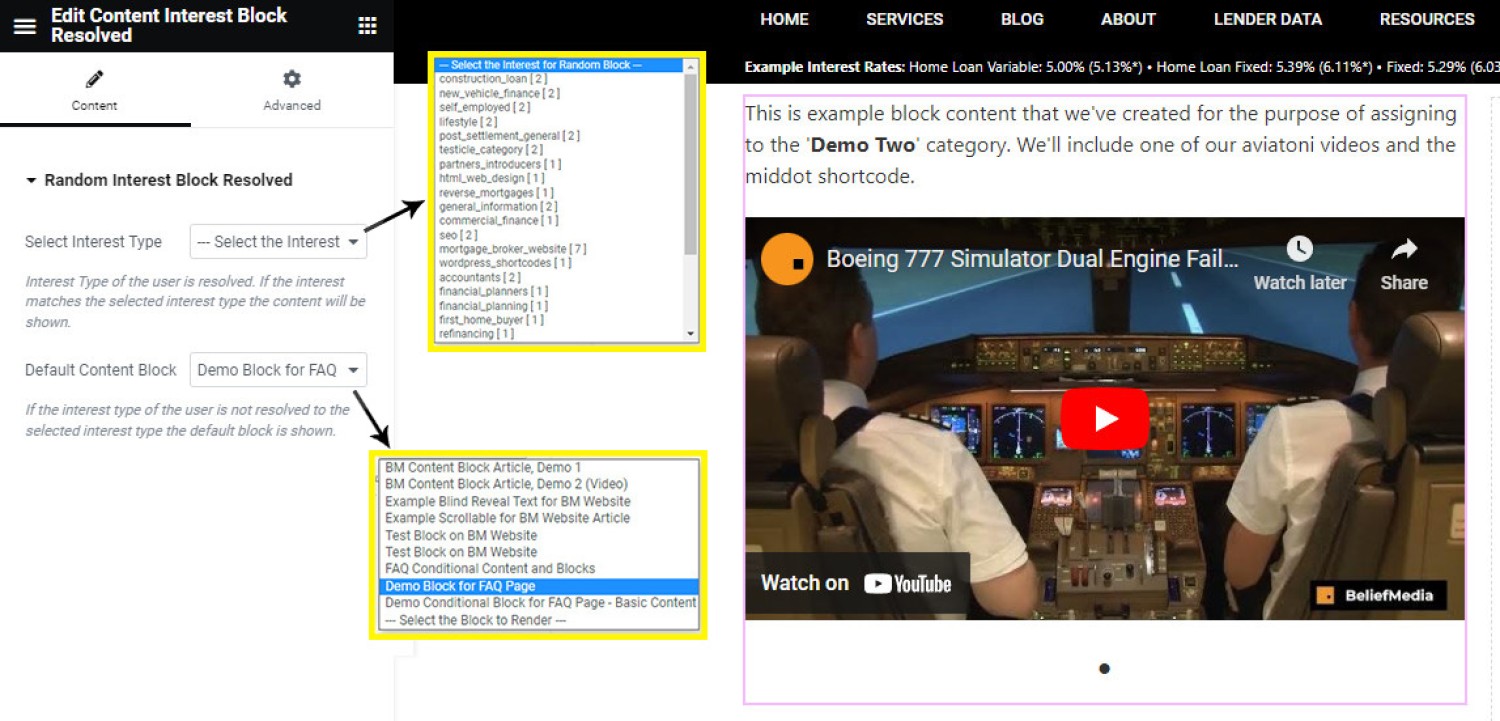
Pictured: The shortcode we introduced above is complicated. In using an the Elementor option you will simply drag-and-drop the applicable block onto your page, define the interest condition, select an optional page, and the result will be returned. The first option that permits you to define the 'interest' is a little confusing since it's not really required. It should only be selected when you would like to cycle through blocks of content assigned to a specific interest type (when used on a purpose-driven page, such as a First Home Buyer page). Leave as 'empty' to have the interest resolved.
When selecting a default page you should be mindful of the location the content will be shown.
Other Block Types
There are a large number of Elementor Block and shortcode options that'll return content in various ways, but they'll be introduced in other FAQ articles. It's the Resolved Block that is the primary method of returning Block-based conditional content.
Another standalone system used for well over 10-years is introduced in an article titled "How to Use the Legacy Conditional Content Blocks " (it's this module that powers the geographic content blocks).
■ ■ ■
Related Content Block FAQs
FAQs relating to use of Content Blocks.
Your website includes a very large number of methods to include different types of headings, including and (both of which serve a specific purpose), with other shortcode and Elementor tools making the addition of various 'headings' a piece of cake. While there are any number of ways to generate page titles, the 2015.3 website framework… [ Learn More ]
There are an extremely large number of tools we make available in Yabber and on your website to create and modify lists and other content blocks, and each method introduces variation on the 'global content theme' in that they present differently and are handled differently on your website. The one premise that underpins any type… [ Learn More ]
There's a large number of ways to return hidden content to your posts and pages using shortcode, and the Toggle Shortcode is simply another option you might choose to use. The feature utilises the same toggle mechanism used in the Formly (form) module. This FAQ will describe basic usage. Shortcode of returns the following: The… [ Learn More ]
In a previous FAQ we introduced to the the 'BM Box'. The 'BM Box' is a navigation and panel element that provides information in a format that was deliberately designed to emulate the general presentation of the Lender Widgets on your website. The BM Box is created in Yabber or Elementor, and a number of… [ Learn More ]
The Conditional Content Blocks arguably the more effective method of rendering blocks of conditional content. The 'Blocks' module introduced to what we're about to described, but if you're starting with Conditional Content, we'd suggest you use this module rather than Blocks simply because of the ease a single page may be assigned to a single… [ Learn More ]
Conditional Content is one of the defining features of your website framework. Despite the fact the Conditional Content blocks are often avoided because of the perceived complexity, they seriously amplify the effectiveness of any organic or promoted funnel. We appreciate that many brokers just 'want a website', and that's find, but if and when the… [ Learn More ]
The BM Box is simply a small element used for the purpose of navigation or information blocks. It is one of two primary blocks we've built, with the second being the BM Panel. The Panel is far more robust and is pending migration into the standard framework. To 'Services' page, accessible from the primary menu… [ Learn More ]
In this FAQ we introduce the very basic 'Reveal' (or 'Blind') shortcode and Elementor widget. Hidden content is revealed after a 'link' is clicked. It's a very simple but highly effective tool. The 'Reveal' tool requires familiarity with the as it is block content that is returned in the blind. The result of a basic… [ Learn More ]
Blocks are simply blocks of content of any type that may be recycled in multiple locations on your website. When they require an update, a single block only needs to be updated in Yabber to globally alter all occurrences of that block on your website. Block content is easy to create, easy to modify, and… [ Learn More ]
Resulting from various State-level Government incentives and fees, one of the areas that differs significantly from state-to-state is the purchase of a first home. The FHB Panel is one of the simplest conditional features of any type to use because it serves content that is resolved by State - not interest, which is the typical… [ Learn More ]
Your website includes a large number of tools to group related content into an accordion-style panel - the Post Accordion is just another one of them. The feature is supported by shortcode and an Elementor block, and the style/presentation is managed in Yabber. This FAQ will show you how to use the tool. An example… [ Learn More ]
Scrollable is a content tool we've introduced as part of our '' module, and downline to Yabber's parent Contentus module. Scrollable simply allows you to include blocks of content in a scrollable window for those cases where you choose to contain large amounts of text in a smaller contained area. An option to render a… [ Learn More ]
The HTML <details> tag is a lesser-used HTML tags which often negates the need to use fancy-pants JavaScript to return 'hidden' content. Our shortcode that references this tags is a ridiculously minor feature, but since it utilises the it was worthy of inclusion. Many businesses have found use for the feature. Your website includes hundreds… [ Learn More ]
Conditional Content FAQs
The Conditional content module is significant. The FAQs listed below may exclude some of the basic conditional features, such as some of the Front Page conditional blocks.
Your website includes a very large number of methods to include different types of headings, including and (both of which serve a specific purpose), with other shortcode and Elementor tools making the addition of various 'headings' a piece of cake. While there are any number of ways to generate page titles, the 2015.3 website framework… [ Learn More ]
The First Email is an action that will conditionally send the first email to a user after a subscription of any type based on their form interaction. The First Email sent to a user will be determined based on the nature of their subscription - are they a subscriber, phone contact, or calendar booking? A… [ Learn More ]
The Conditional Content Blocks arguably the more effective method of rendering blocks of conditional content. The 'Blocks' module introduced to what we're about to described, but if you're starting with Conditional Content, we'd suggest you use this module rather than Blocks simply because of the ease a single page may be assigned to a single… [ Learn More ]
Conditional Content is one of the defining features of your website framework. Despite the fact the Conditional Content blocks are often avoided because of the perceived complexity, they seriously amplify the effectiveness of any organic or promoted funnel. We appreciate that many brokers just 'want a website', and that's find, but if and when the… [ Learn More ]
We generally advocate for brokers to position themselves in various ways by way of standalone websites that have a defined siloed audience and serve a very specific purpose. However, managing multiple websites can be problematic for a number of reasons, with duplicate content and time requirements probably topping the list. If managed correctly - and… [ Learn More ]
You want those marketing assets on the periphery to property represent your brand, but you also want them to be consistent with your trending website traffic or consumer sentiment. For example, with the introduction of a FHB or Investor incentive of some kind you will likely want your broader marketing footprint to reflect this, or… [ Learn More ]
You want those marketing assets on the periphery to property represent your brand, but you also want them to be consistent with your trending website traffic or consumer sentiment. For example, with the introduction of a FHB or Investor incentive of some kind you will likely want your broader marketing footprint to reflect this, or… [ Learn More ]
It's typical to change your social media banners of all types based on seasons, such as Christmas, Anzac Day, Easter or similar. A module in Yabber permits you to define start and stop dates for a specific banner, and that banner will automatically be applied (and later replaced with your 'default' banner). This FAQ shows… [ Learn More ]
Conditional Content is content that is delivered to a user based on resolved borrowing objective, occupation, campaign links, or interest. In the property field the Interest might be a particular type of property or a category of buyer. Supported by , the use of Conditional Content must be considered an advanced feature, although those elements… [ Learn More ]
Almost without question, BeNet is the single most sophisticated AI made available in the finance industry. For all intents and purposes, it has to be considered to be an extremely knowledgeable mortgage broker with an expert understanding of digital marketing, processes, systems, policies, property, finance, best practice, and your marketing efforts. BeNet is connected to… [ Learn More ]
In a previous FAQ we look at how to create and manage "" for Your Entire Website or a Single Page. The system defined modals that will shown on your website after a defined number of seconds, or when the user indicates intent to leave the page. In this FAQ we'll look at how to… [ Learn More ]
This FAQ will details how to use the standard Entry and Exit modals on your website. The Modal module is quite large and includes a number of options designed specifically for the finance industry, so what we're dealing with here is how to create and maintain the 'standard' entry and exit modal as it applies… [ Learn More ]
Resulting from various State-level Government incentives and fees, one of the areas that differs significantly from state-to-state is the purchase of a first home. The FHB Panel is one of the simplest conditional features of any type to use because it serves content that is resolved by State - not interest, which is the typical… [ Learn More ]
Conditional Content is content that is delivered to a user based on resolved borrowing objective, occupation, campaign links, or interest. Your website is a shape-shifting chameleon in that it delivers different content to different users in order to maintain higher levels of engagement and ultimately convert more clients. Conditional features are designed to amplify the… [ Learn More ]
Forma And Panel escalation is a component of the large Conditional Content framework that underpins your mortgage broker website and finance funnels. Basic conditional content features are introduced in an FAQ titled , while advanced methods are addressed individually. One of the simplest conditional options to employ in your website early on in your marketing… [ Learn More ]