Your website includes a large number of tools to group related content into an accordion-style panel - the Post Accordion is just another one of them. The feature is supported by shortcode and an Elementor block, and the style/presentation is managed in Yabber. This FAQ will show you how to use the tool.
An example of the fully rendered output is shown at the bottom of every FAQ article within this FAQ module. We use the feature to group FAQ articles that share the same category into a block of content.
Returning Article Accordion with Elementor
Given the complexity of shortcode, the Elementor method of returning the accordion to any page is preferred. Search 'BM Posts Accordion' in Elementor, drag and drop the block onto any page, and set the values that'll determine the returned results.
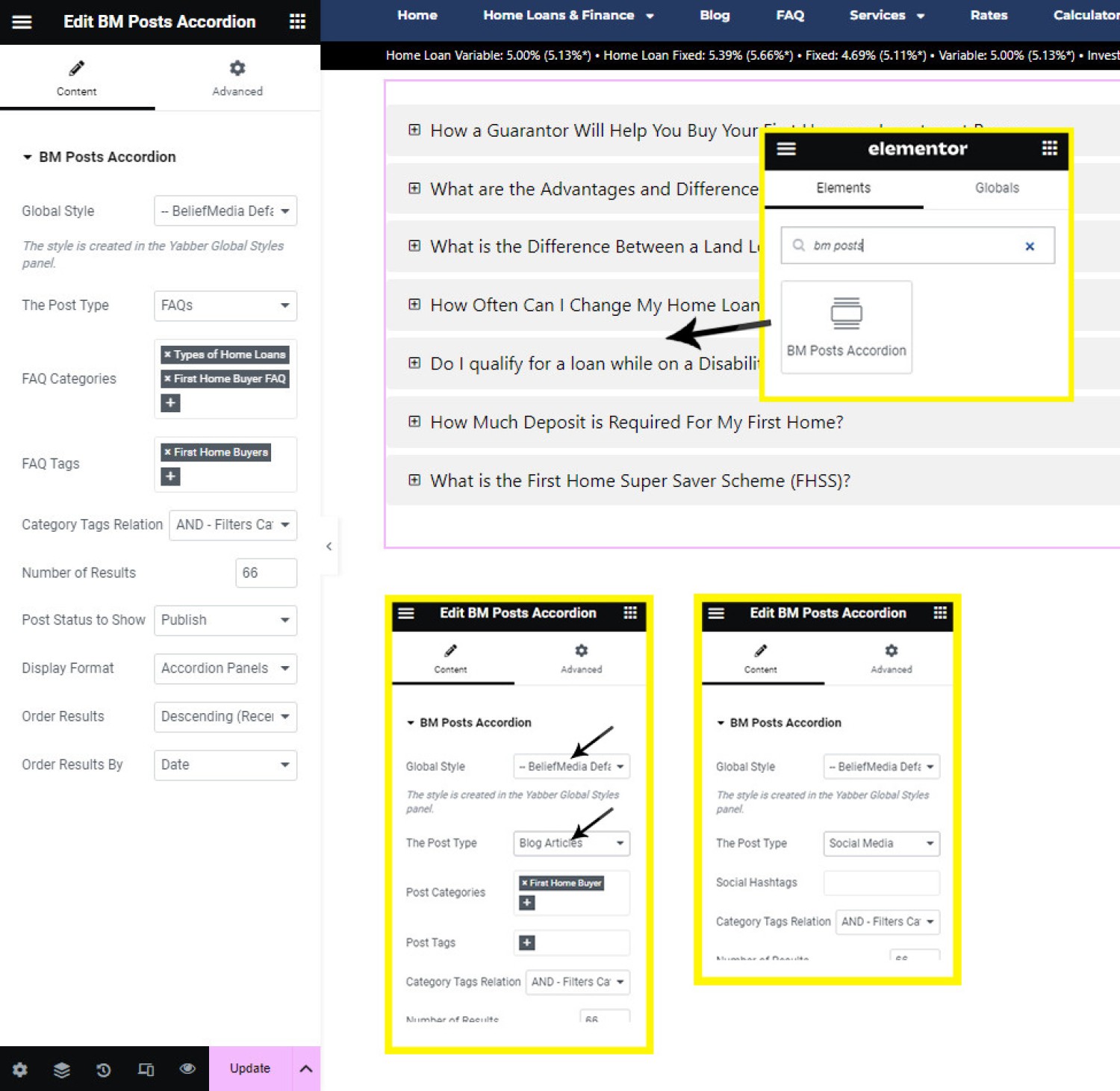
Pictured: Given the complexity of shortcode, the Elementor method of returning the accordion to any page is preferred. Search 'BM Posts Accordion' in Elementor, drag and drop the block onto any page, and set the values that'll determine the returned results.
You should select the applicable post categories and/or tags, with tags shown that are associated with the selected post type (Blog, FAQ etc.). The style is created via the Global Accordion Style module. The number of results returned should be defined, and the post order attributes should be set, although you should generally leave them with their default value. The 'Category Tags Relation' is an option that requires care because it can limit your results in unexpected ways. The option provides for two values: 'AND', or 'OR', with the former matching posts that are in the selected category and have the assigned tags, while the 'OR' option will select the articles from the selected categories and those articles matching the post tags.
The result will cache for at least an hour for fast retrieval.
Returning Article Accordion with Shortcode
Using shortcode to return the accordion is complex and best avoided. We will include a shortcode builder at some point, and when we do you'll find details here. In the meantime, if you're brave enough to use shortcode, the basic syntax is as follows: [bm_category_posts number="10"]. This will return the last ten posts from our blog. The result:
The mortgage broker website framework should be understood as two systems operating at once. On the surface, the architecture of the website tells the story of the business through a compliant public-facing infrastructure that forms the basis of a coherent framework. The page and content architecture gives your website depth, credibility, search value, education value,… [ Learn More ]
The following section looks at advertisements from successful historic campaigns that had an impact on the manner in which the market perceived their position in the market and helped shape the brands. You should download our Marketing Guide to gain an appreciation of positioning in general and in broader advertising. … [ Learn More ]
I'm exposed to competing definitions of positioning, differentiation, targeting, and points of difference every day, so this article seek to provide a basic understanding of what part each of them plays in your marketing and advertising efforts. The article supports another titled "" that… [ Learn More ]
How deregulation, securitisation, mortgage management, independent broking and distribution technology created one of the most consequential institutions in Australian finance. Finance aggregation is now part of the institutional infrastructure of Australian lending. It connects thousands of independently owned mortgage and finance broking businesses with banks, non-bank lenders, mortgage managers, insurers, technology providers and regulators.… [ Learn More ]
Corporate litigation rarely attracts the attention of an entire industry. Most disputes between shareholders remain confined to boardrooms, courtrooms and legal practitioners, carrying little consequence beyond the commercial interests of the parties themselves. Occasionally, however, a case emerges that transcends the immediate dispute, raising broader questions about governance, commercial… [ Learn More ]
The notion of “owning” a client list in mortgage broking is one of the most persistently misunderstood constructs in financial services law. Brokers frequently assume that the client relationship - particularly once initiated through personal rapport and ongoing servicing - attaches to the individual broker rather than… [ Learn More ]
There are remarkably few subjects within modern mortgage broking that generate greater uncertainty than the prospect of unsolicited contact. Brokers understand cold calling. They understand digital advertising, social media campaigns, referral arrangements, seminars, direct mail and purchased leads. Yet the question of whether a mortgage broker may physically walk through a neighbourhood and knock… [ Learn More ]
The increasing digitisation of credit intermediation has produced a structural evolution in how credit assistance is delivered, particularly through embedded third-party forms hosted within broker or aggregator-controlled digital environments. While such arrangements are often presented as operational efficiencies or specialist referral pathways, their legal and regulatory implications under the National Consumer Credit Protection Act 2009… [ Learn More ]
I came across a today where a broker was scouting for an individual for the purpose of cold calling potential mortgage clients with renumeration determined by the loan size. Apart from the fact that the employment conditions are typically appalling, the role itself is one that exposes… [ Learn More ]
The advertising of mortgage interest rates occupies a unique position within consumer protection law. Unlike most forms of commercial advertising, the promotion of credit products is subject to an unusually prescriptive legislative framework that attempts to reconcile two competing realities. On one hand, consumers require simple and accessible indicators by which to compare competing mortgage… [ Learn More ]
If we wanted to return only the last four posts from our blog from the Lender Data Category that also included a tag of shortcode, the following would be used: [bm_category_posts categories="lender-bank-data" tags="shortcode" number="4"]. The result:
LoanOptions.AI are an asset finance company that leverages their technology by making it available to mortgage brokers. Asset finance filter through to LoanOptions, while home loan leads are fed back to brokers. We've had a couple of our own brokers partner with the company so we built a standalone WordPress plugin to quickly enable the… [ Learn More ]
A couple of years ago we introduced a that'd return formatted rates within a style of textbox. On the back of a recent request from a client, we've created a new style of featured panel that'll return a similar lender rate textbox that is managed entirely from Yabber. While the former… [ Learn More ]
There are dozens of ways in which you may render lender data on your , and this data includes page-level archives that'll return information in an indiscriminate manner to support your funnel and educate your clients. These archives are supported by various panels and widgets that are used to showcase data of… [ Learn More ]
Built on the back of our Lender Data API, and supplementing features such as Lender Widgets, Rate Ribbons, Rate Blocks, Lender Archives, and Lender Product Pages, we've just released the Lender Document (and Media) APIs. Our is now shipped with an Elementor Block that'll enable the features we're about to describe.… [ Learn More ]
Now, there's specific FAQ panels for the FAQ module, and there's another shortcode that goes by the name of bm_accordion - both of which are introduced elsewhere for entirely different reasons, but if you get fancy with your bm_category_posts shortcode attributes you may essentially replicate the same result... albeit with a few omitted features. The shortcode necessary to return the five latest FAQ posts from the 'Website' category that include the 'links' or 'related-content' tag is as follows: [bm_category_posts cpt="faq" categories="Website" tags="links,related-content" number="5"]. The result:
No articles to show.
We did say that shortcode introduces complexity, and the available attributes supports that claim. Available attributes are as follows:
Primary Accordion Filtering
- categories
- tags
Primary Accordion Panel Style [ Should Still Reference Yabber Profile ]
- accordion_colour_resting - Defaults to
#F1F1F1. - accordion_colour_resting_text - Defaults to
#FBFBFB. - accordion_colour_resting_text_weight - Defaults to
normal. - accordion_colour_selected - Defaults to
#009639. - accordion_colour_selected_text - Defaults to
#FBFBFB. - accordion_colour_selected_text_weight - Defaults to
normal. - accordion_colour_hover - Defaults to
#61CE70. - accordion_colour_hover_text - Defaults to
#009639. - accordion_colour_hover_text_weight - Defaults to
normal.
Primary Accordion Style
- words - Number of words in the accordion panel. Defaults to 55.
- truncate - Truncated title length in characters. Defaults to 80.
- font_size - The accordion content font size. Defaults to 0.9.
- font_size_title - Size of the tile text. Defaults to 1.0.
- line_height - The line height of the accordion content. Defaults to 1.3.
- height - The height of the accordion title panel. Defaults to 40.
- more - The 'Learn More' text. Defaults to 'Learn More'.
- more_style - The more style CSS if required (advanced - best to ignore).
- icon - The icon applied before title text. A HTML Entity or Font Awesome slug is accepted.
- profile - The profile is the style. Defaults to 'default'.
Query Attributes
- cpt - The Custom Post type if required (
cpt="faq"). - taxonomy - May be required for advanced queries. Best to ignore.
- field - Deprecated in most cases. The field we search against (now defaults to and is fixed at 'slug').
- term - A comma-delimited string of category slugs (as shown in the examples).
- post_status - The Post Status. Either
publish,draft, orfuture. - orderby - Order results on post_title, date, etc (full list on WP.org
 ). Defaults to 'date'.
- order - The order of results (based on orderby). Either ASC or DESC. Defaults to DESC.
- number - The number of results to return. Value of '-1' is all results. Defaults to '-1'.
General Container (Style)
- margin_bottom - Margin above container. Defaults to 30.
- margin_top - Margin above container. Defaults to 30.
- cached - Time to cache the results. Defaults to 86400 (one day).
As you can tell, you'd want to be a little nuts to use a static shortcode profile when they're so easily created and managed in Yabber.
■ ■ ■
Related Content Block FAQs
FAQs relating to use of Content Blocks.
Your website includes a very large number of methods to include different types of headings, including and (both of which serve a specific purpose), with other shortcode and Elementor tools making the addition of various 'headings' a piece of cake. While there are any number of ways to generate page titles, the 2015.3 website framework… [ Learn More ]
There are an extremely large number of tools we make available in Yabber and on your website to create and modify lists and other content blocks, and each method introduces variation on the 'global content theme' in that they present differently and are handled differently on your website. The one premise that underpins any type… [ Learn More ]
There's a large number of ways to return hidden content to your posts and pages using shortcode, and the Toggle Shortcode is simply another option you might choose to use. The feature utilises the same toggle mechanism used in the Formly (form) module. This FAQ will describe basic usage. Shortcode of returns the following: The… [ Learn More ]
In a previous FAQ we introduced to the the 'BM Box'. The 'BM Box' is a navigation and panel element that provides information in a format that was deliberately designed to emulate the general presentation of the Lender Widgets on your website. The BM Box is created in Yabber or Elementor, and a number of… [ Learn More ]
The Conditional Content Blocks arguably the more effective method of rendering blocks of conditional content. The 'Blocks' module introduced to what we're about to described, but if you're starting with Conditional Content, we'd suggest you use this module rather than Blocks simply because of the ease a single page may be assigned to a single… [ Learn More ]
Conditional Content is one of the defining features of your website framework. Despite the fact the Conditional Content blocks are often avoided because of the perceived complexity, they seriously amplify the effectiveness of any organic or promoted funnel. We appreciate that many brokers just 'want a website', and that's find, but if and when the… [ Learn More ]
The BM Box is simply a small element used for the purpose of navigation or information blocks. It is one of two primary blocks we've built, with the second being the BM Panel. The Panel is far more robust and is pending migration into the standard framework. To 'Services' page, accessible from the primary menu… [ Learn More ]
In this FAQ we introduce the very basic 'Reveal' (or 'Blind') shortcode and Elementor widget. Hidden content is revealed after a 'link' is clicked. It's a very simple but highly effective tool. The 'Reveal' tool requires familiarity with the as it is block content that is returned in the blind. The result of a basic… [ Learn More ]
Blocks are simply blocks of content of any type that may be recycled in multiple locations on your website. When they require an update, a single block only needs to be updated in Yabber to globally alter all occurrences of that block on your website. Block content is easy to create, easy to modify, and… [ Learn More ]
Resulting from various State-level Government incentives and fees, one of the areas that differs significantly from state-to-state is the purchase of a first home. The FHB Panel is one of the simplest conditional features of any type to use because it serves content that is resolved by State - not interest, which is the typical… [ Learn More ]
Your website includes a large number of tools to group related content into an accordion-style panel - the Post Accordion is just another one of them. The feature is supported by shortcode and an Elementor block, and the style/presentation is managed in Yabber. This FAQ will show you how to use the tool. An example… [ Learn More ]
Scrollable is a content tool we've introduced as part of our '' module, and downline to Yabber's parent Contentus module. Scrollable simply allows you to include blocks of content in a scrollable window for those cases where you choose to contain large amounts of text in a smaller contained area. An option to render a… [ Learn More ]
The HTML <details> tag is a lesser-used HTML tags which often negates the need to use fancy-pants JavaScript to return 'hidden' content. Our shortcode that references this tags is a ridiculously minor feature, but since it utilises the it was worthy of inclusion. Many businesses have found use for the feature. Your website includes hundreds… [ Learn More ]
General Shortcodes
Yabber includes dozens of shortcodes that may be applied in posts and pages to return different types of content. The shortcodes listed here are very general in nature and are not usually associated with a large module.
The blockquote HTML element indicates that the enclosed text is an extended quotation - usually sourced from an external source. Our blockquote shortcode supports the blockquote standard when an external URL is cited as a reference, and basic usage simply supports an indented block of text. This will make sense in a moment. The result… [ Learn More ]
The Quotes module wasn't designed for your website, but since the feature existed, we were obligated to integrate the tools. The feature was primarily designed for you to add quotes that would be converted to images for social media, and a secondary advantage of the feature (albeit one reserved for advanced users) allows for a… [ Learn More ]
The Screenshots shortcode will embed a screenshot of a remote webpage into your own website. Initially created for the well over 10-years ago, the tool has since created millions of screenshots reliably and almost without error. Screenshots isn't one of those features you'll use every day, but like a lot of what you'll find in… [ Learn More ]
Scrollable is a content tool we've introduced as part of our '' module, and downline to Yabber's parent Contentus module. Scrollable simply allows you to include blocks of content in a scrollable window for those cases where you choose to contain large amounts of text in a smaller contained area. An option to render a… [ Learn More ]
We archive about as much data as ASIC and other regulatory bodies or institutions make available. The API we make available to all clients by virtue of their assigned key provides access to a large number of resources and tools - most of which you will never use. The API itself is used to measure… [ Learn More ]
The Published versus Comparison Rate graph was created to support a single FAQ on 'What is a Comparison Rate', but the graph often finds value elsewhere. To include the graph on your page, use the shortcode of . The Result: The graph simply illustrates how the published rate is often vastly different to the comparison… [ Learn More ]
This feature can largely be ignored. This was a feature introduced to support our managed article program, and a former plug-and-play Platinum graphing block is forthcoming. It is expected that you will not use this shortcode. It should be noted that shortcode is never a good way in which to create custom graphs as the… [ Learn More ]
The exchange rate graph return major currencies compared against the Australian dollar. It's not a particularly pretty chart but the colour values may be altered by way of shortcode (we've used very different bold colours to clearly differentiate one currency from another). Inclusion is made with the shortcode of . The result: Various attributes may… [ Learn More ]
In an FAQ titled "" we looked at how to include a standard cash rate graph on your website (which included inflation and API data). This FAQ will show you how to include a standalone Inflation Graph with simple shortcode. Until the plugin update of January 2026 we used a clumsy image graph that was… [ Learn More ]
There are times where you will need to return the current cash rate into your website (often in your website footer as a quick reference). The shortcode of will return % (bolding is ours). Simple. Note that the current cash rate is always shown in the header of your website. This panel links to a… [ Learn More ]
An RBA Cash Rate graph is shown by default on a page linked to in your header (image below), although the graph may be shown anywhere, and its presentation may be altered in a large number of ways. The graph is used in a number of FAQ pages, and we often include date-ranged graphs in… [ Learn More ]
The 'ImageCalc' graphing tool was initially designed to easily integrated graphs into automatically generated PDF documents. It has since been used by brokers in their articles because of its ease of use. The most common methods of including the graphs into standard articles is with simple shortcode, while Elementor is the methods generally sued when… [ Learn More ]
We;ve had a 'Metals API' for a number of years, but not unlike Bitcoin and other data that shrouds industry discussion, it wasn't entirely relevant. However, in the January 2026 plugin update we decided to include the graph on the standalone graphing page as a result of popular discussions on the topic, and lender policies… [ Learn More ]