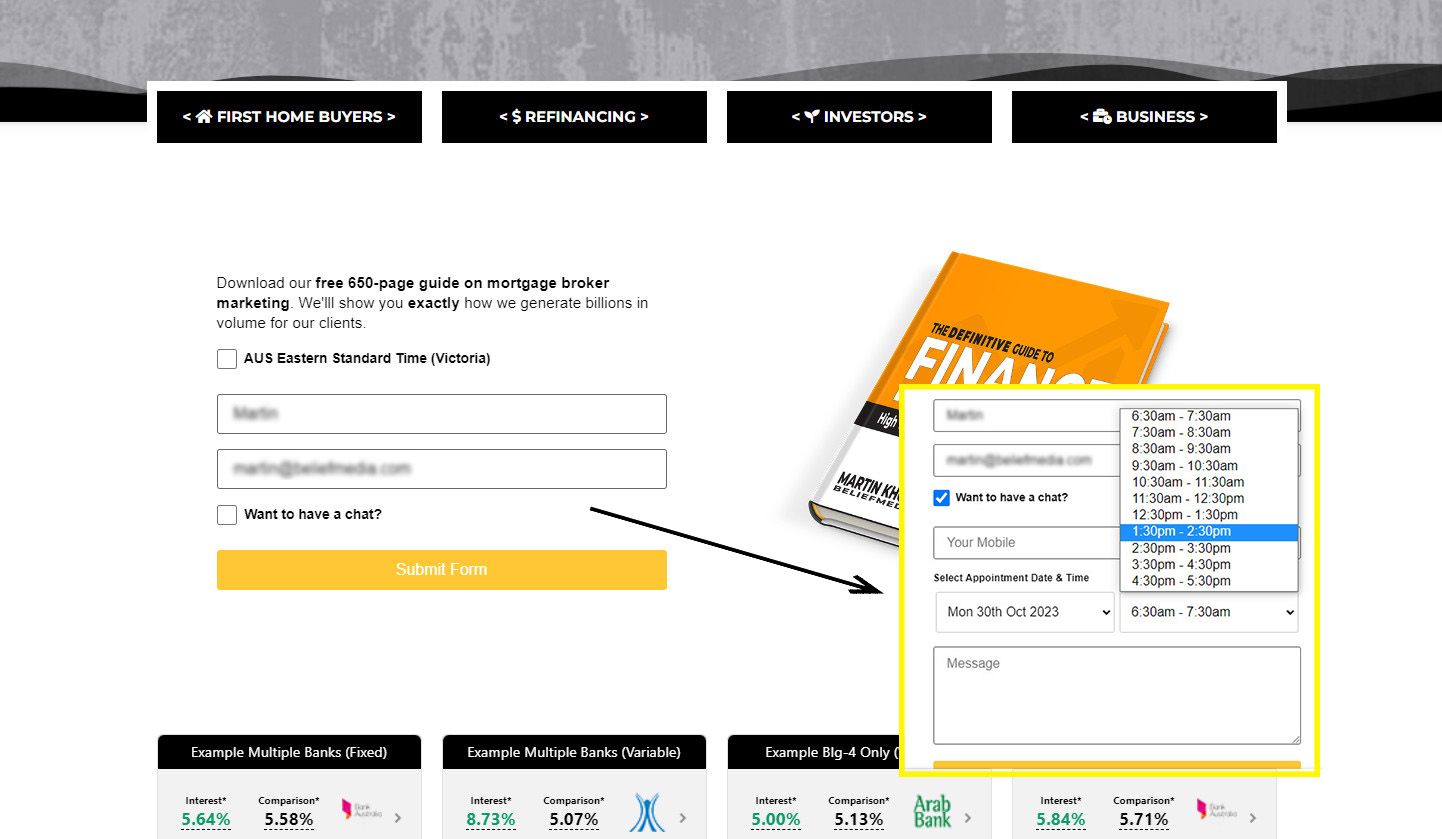
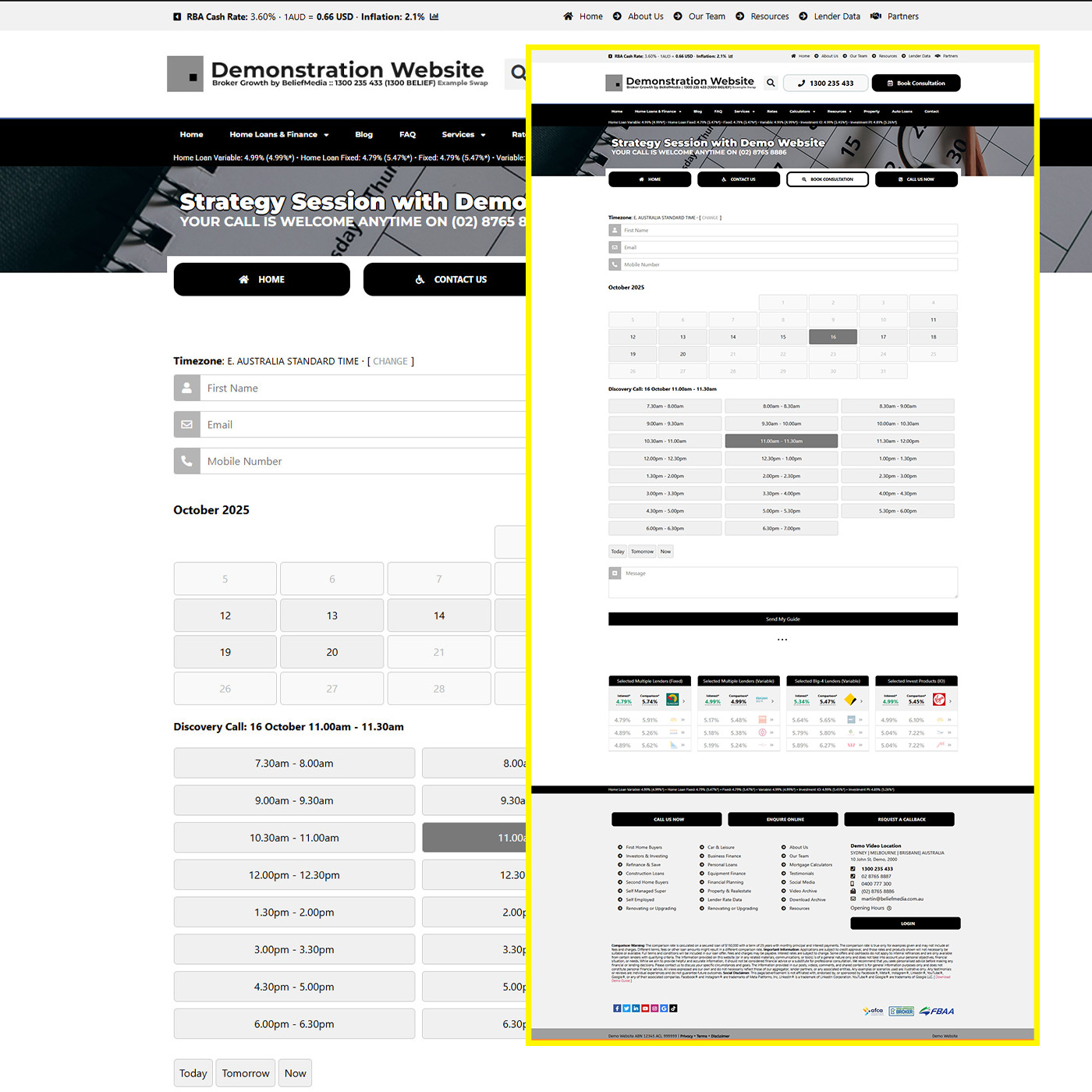
This FAQ applies to those that have an established Azure application but the functionality is failing, most likely indicated by the failure of your website calendars forms  , or full-page calendars . The first step when any Microsoft connectivity fails is to reconnect via the 'CONNECT' panel, although this is a step that's required every couple of months to ensure that the integrity of your Microsoft connection is maintained. If this fails, it is very likely be associated with the expiry of your application Secret Value (as defined and saved in Yabber ).
First, the process for creating an application is detailed in full in an FAQ titled "Creating a Microsoft 365 Azure Application". The FAQ details the creation of the Secret Value, and you can reference that section in isolation to recreate the required Value (while deleting the old value). This FAQ will detail the process of recreating the Secret Value in isolation of any other action. Once the Secret Value is updated, we'll have to updated Yabber with the new Value and then reconnect to Microsoft via the Connect panel.
Creating a New Secret Value
The screenshots below showing early steps are similar to those included in the Azure application FAQ. If you require support, it must be done over the phone.
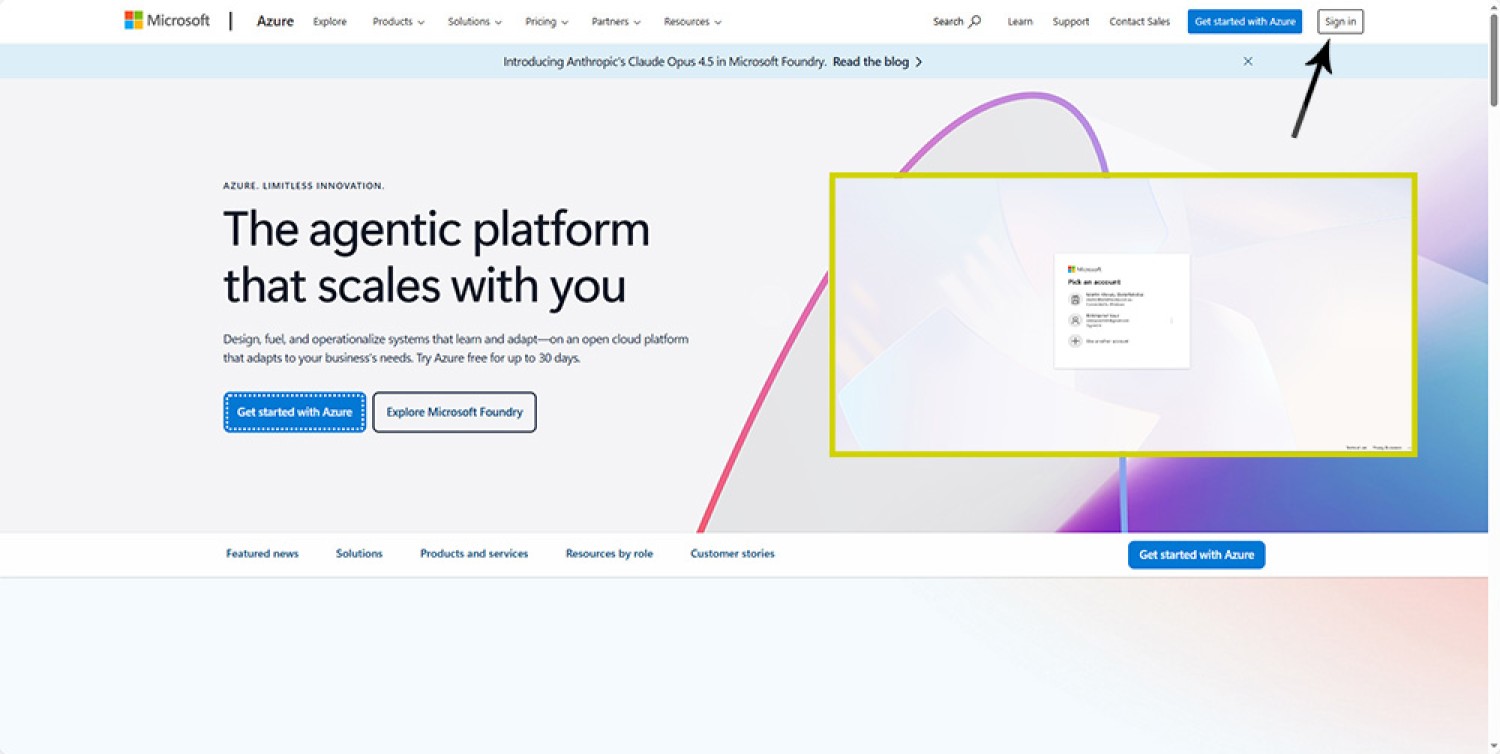
1. Log into portal.azure.com
You'll need an administrator MS365 Business email account. First, log into portal.azure.com  .If we're building the application on your behalf, please check your login before supplying us with credentials. Sign in with your MS365 administrator credentials.
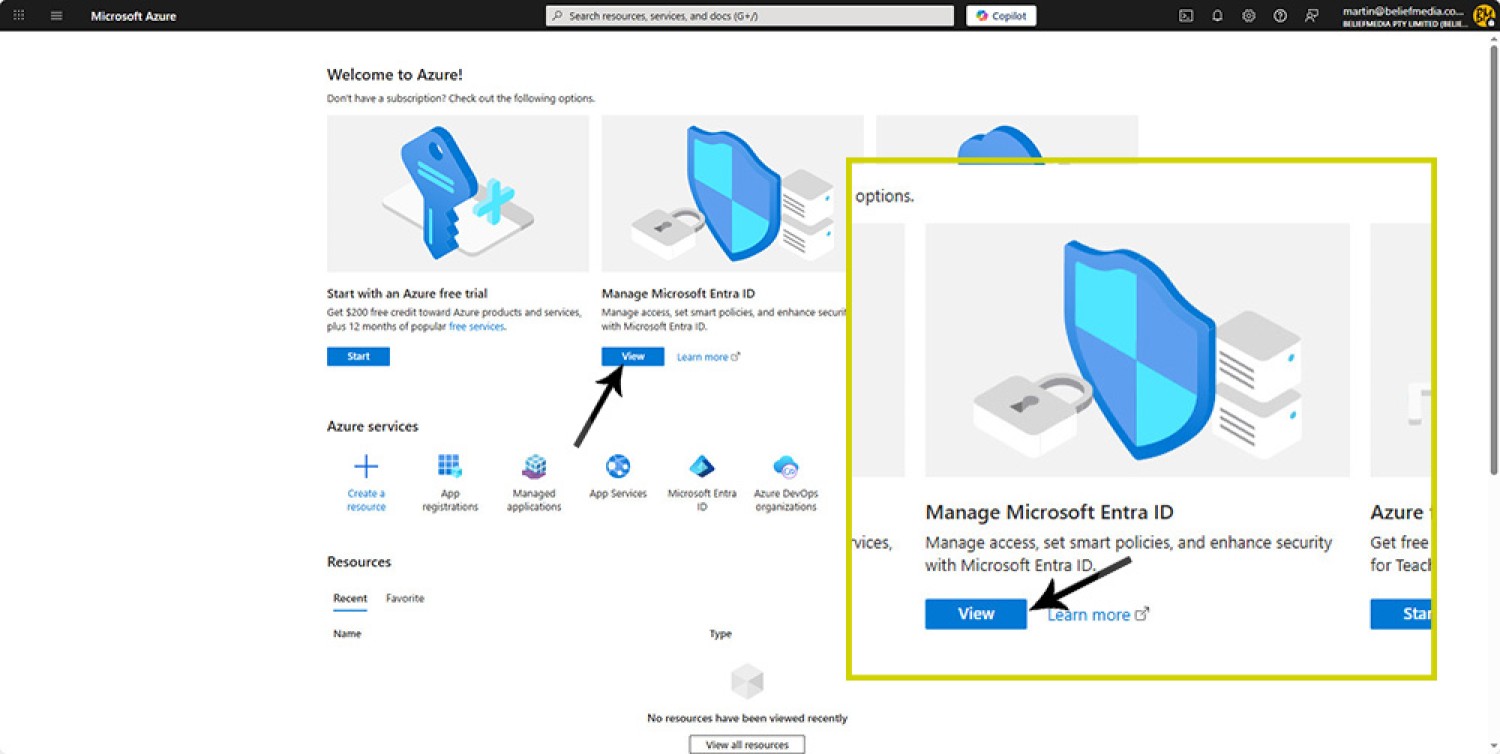
2. Azure Welcome Screen
You will be presented with a welcome screen. Click 'Manage Microsoft Entra ID' (View).
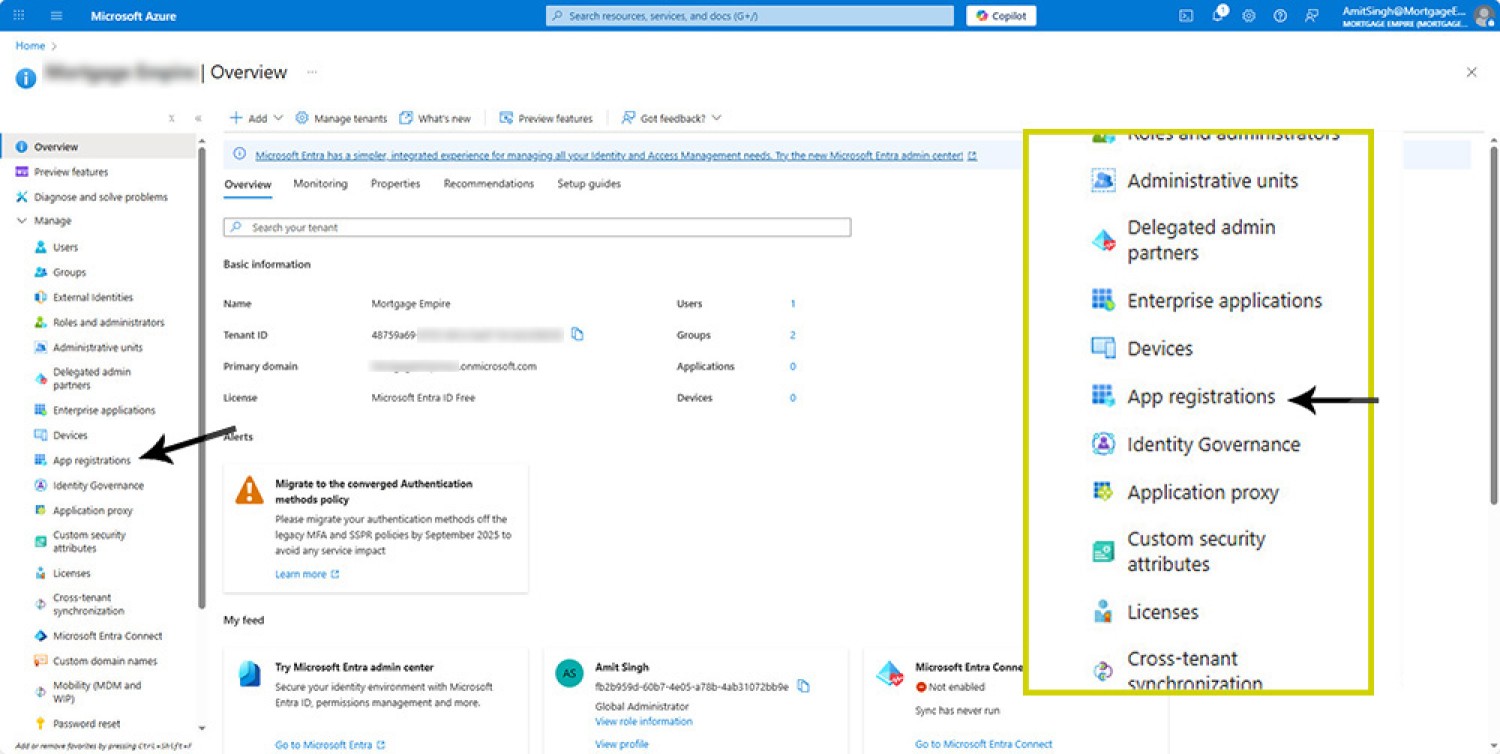
3. Azure Application Registrations
It's at this point that we're going to start creating your application. Select 'App Registrations' from the left panel.
●
4. Certificates and Secrets Menu Option
Select the Certificates and Secrets option from the left menu panel.
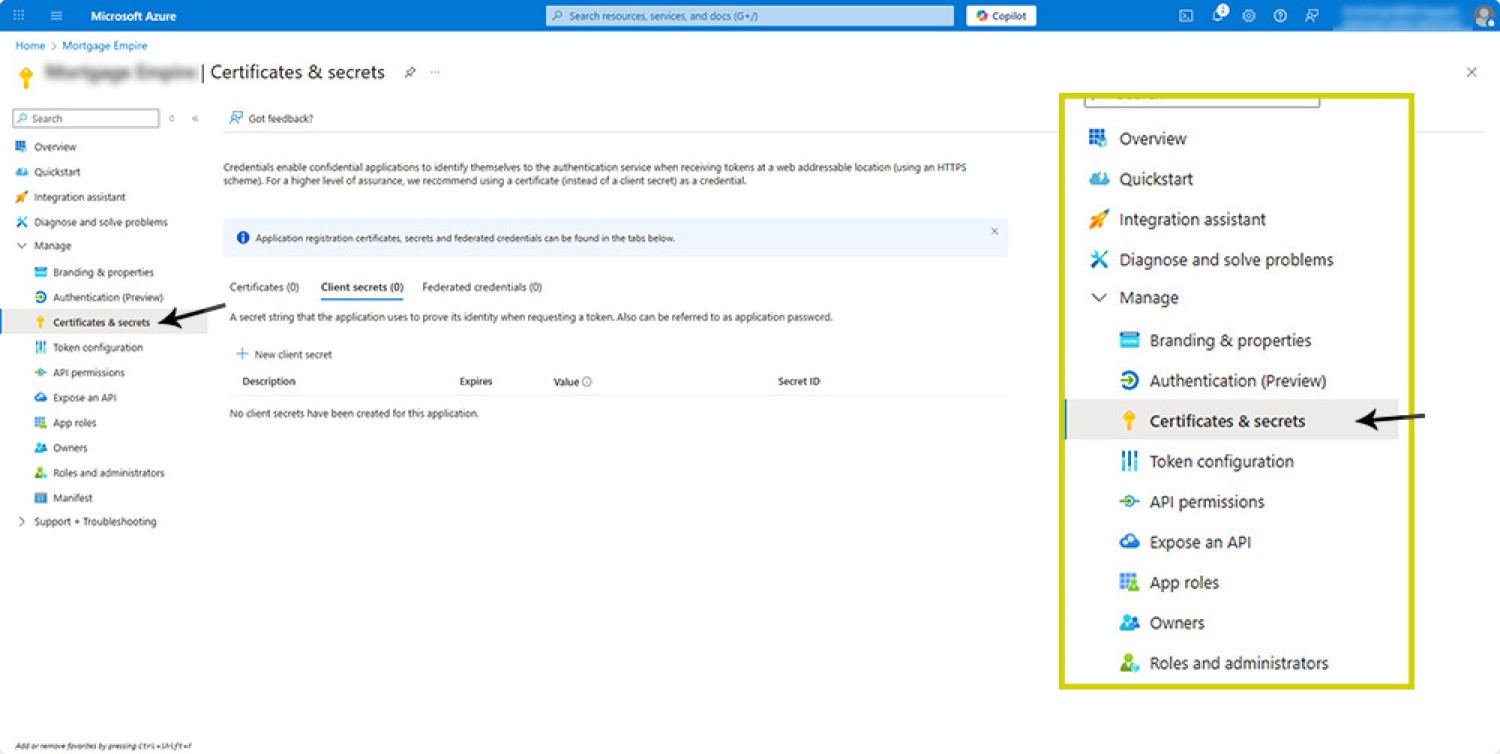
This option opens up the important Certificates and Secrets page.
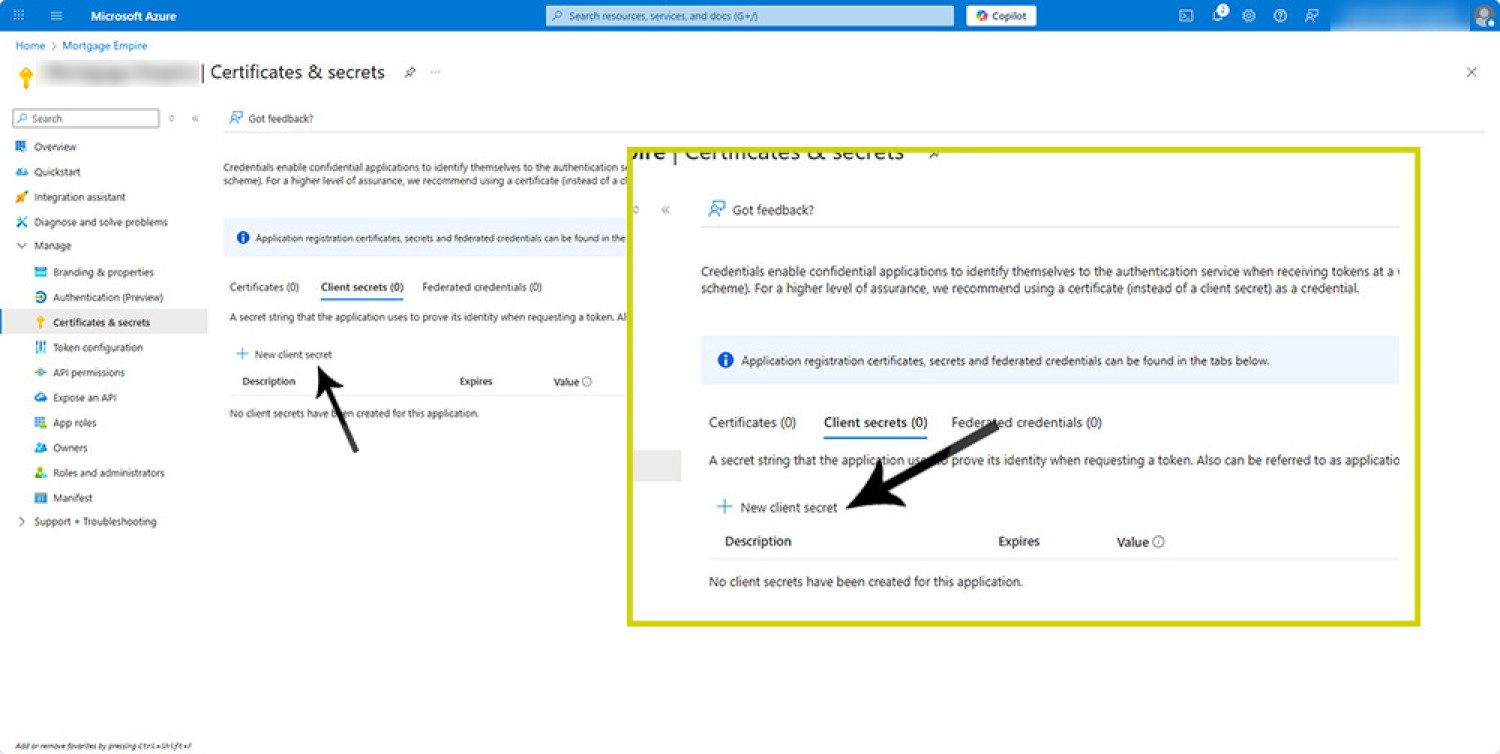
5. Create New Client Secret
From the returned Certificates and Secrets page, select 'New client secret'. This will create the application secret required in Yabber, so it's important.
6. Create New Client Secret and Set Expiry
Selecting 'New client secret' returns a panel to the right (or left). You are required to add a name for this secret (such as XYZ Business, 26SEP2026) and select the required expiry. Select the highest expiry available - usually 730 days (24 months). After this expiry we'll be required to update the application secret for continued connectivity.
Once you have populated these values, select 'Add'. This action will create the secret and return you back to the open screen with newly created values.
7. Copy The Secret Value
This is where Microsoft's naming convention is a little questionable. It's the Secret Value that we'll be copying into Yabber - not the Secret ID, a common mistake. Either way, copy both the Value and Secret ID into Notepad with very clear labelling.
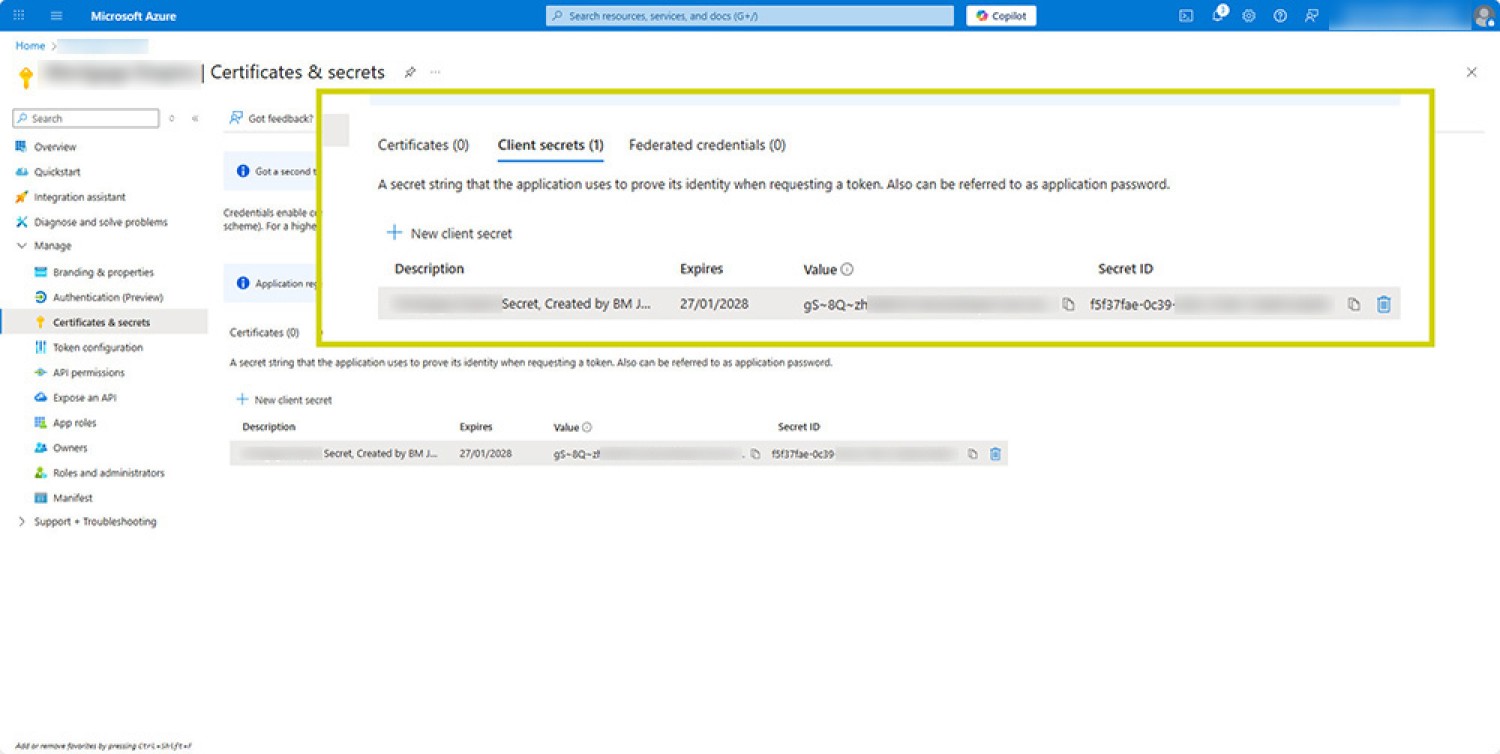
Not the 'Expires' time. After this date your application will cease functioning and a new Secret Value will be required.
You may delete your old secret.
It's possible that additional questions will be asked during the process, or other data might be required. If the Redirect URI or other details are required, the information is available from the Creation FAQ.
Update Yabber
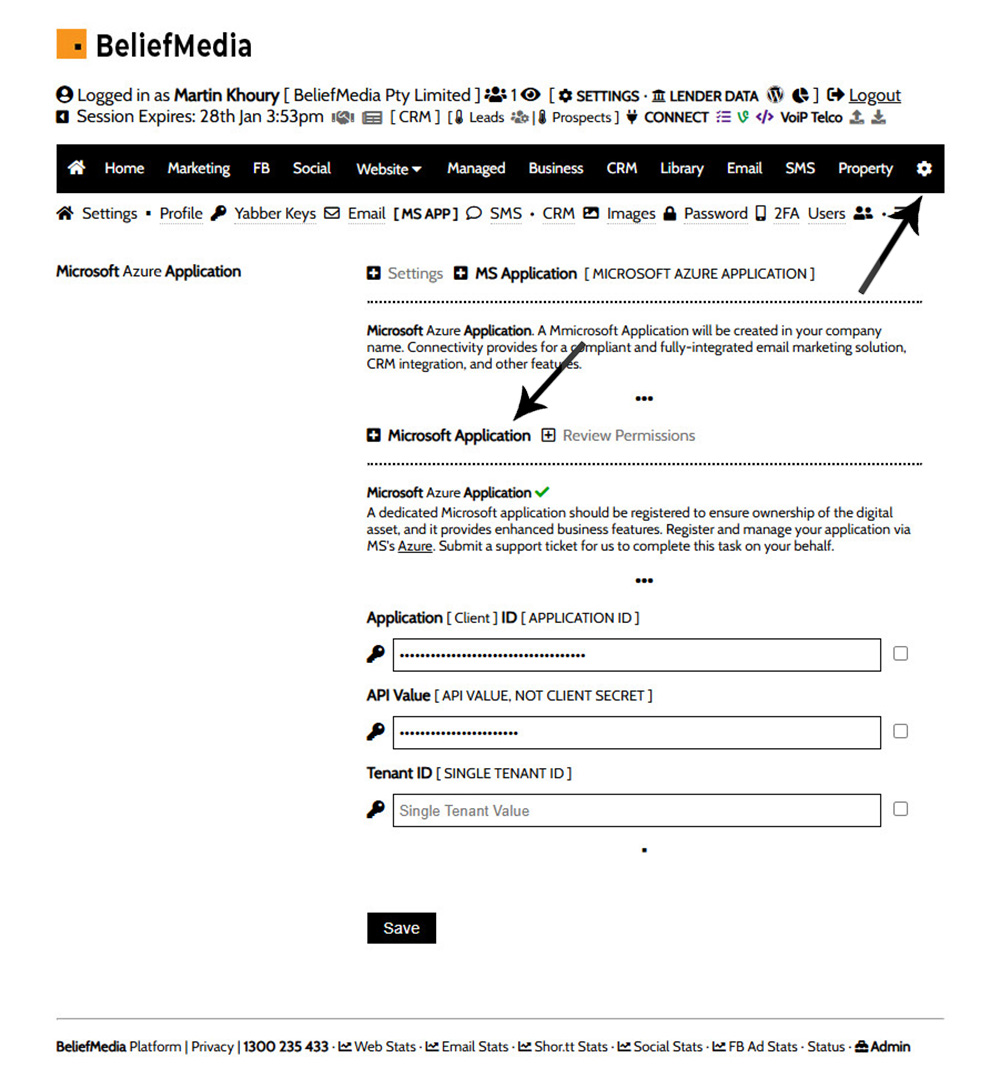
Log into Yabber, navigate to the MS APP page (via the Settings 'gear' icon), and update the Value (in the 'API Value' field). Note that this is the Value, not the Secret ID - rather confusing).
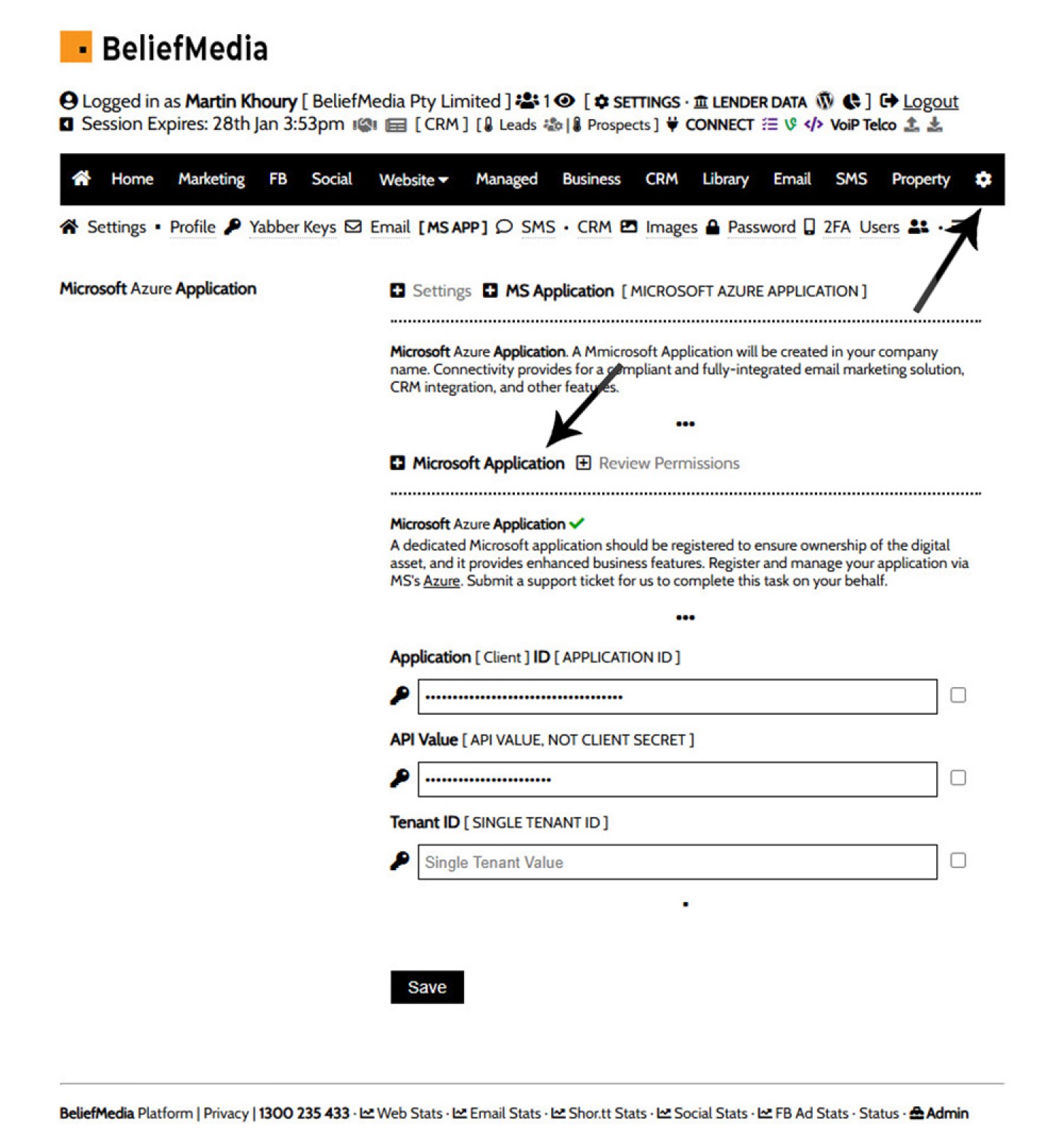
Pictured: Select the 'gear' settings icon from the top right, and then select 'MS APP' from the child menu. An option is returned for each of the required values.
The small checkbox to the right will show values. Popular the required values and click 'Save'.
Updating Permissions
Now is a good time to update Yabber permissions. Doing so gives you full access to various tools, and the permission structure is updated about twice a year so it's possible your application is out-of-date. Review the required FAQs from the Application Creation Page (scroll down to the bottom).
Conclusion
This process will be required (at best) every couple of years. We're happy to complete it for you, but you'll need to text a current username and password to whoever manages your account. If two-factor authentication is required, you'll need to respond to any text or call - it's much quicker to give it a go yourself for this reason.
■ ■ ■
Related Microsoft FAQs
Microsoft is heavily integrated into your social and marketing tools. Selected Microsoft FAQs are shown below.
Yabber is not a CRM. Yabber is a marketing system designed to communicate with various CRMs in various ways and manage marketing assets. Yabber users are generally synced via your CRM to Yabber, or visa versa, and each contact in Yabber is usually resolved to a CRM user automatically (by phone number, email, or some… [ Learn More ]
As described in an FAQ titled "", Yabber is not a CRM. Yabber is a marketing system designed to communicate with various CRMs in various ways and manage marketing assets. Yabber users are generally synced via your CRM to Yabber, or visa versa, and each contact in Yabber is usually resolved to a CRM user… [ Learn More ]
Connectivity with Microsoft OneDrive enables different types of syncing and sharing options across a large number of modules. Initially designed to sync client documents uploaded via the FileInvitation module, it has since found its way into about a dozen modules. Note that enabling this modules gives Yabber access to only those folders that it creates… [ Learn More ]
Microsoft Contact Folders aren't as relevant as they once were, and the 'new' (2024) versions of Outlook will categorise contacts with 'Categories' rather than folders, although folders are still made available even if they're not part of the standard Outlook interface. Yabber will still require that a contact folder be applied from time-to-time, although they're… [ Learn More ]
Part of our website and Yabber architecture requires that we create a on your behalf. This application is owned by you, and the applicable keys from that application are stored in Yabber which enables considerable integration between your website and other marketing (such as email marketing). We generally request only those permissions that are required,… [ Learn More ]
In various FAQs we introduce the concept of a 'Dynamic Email Signature', or a signature that references engaging up-to-date information of a specific type. We know that every touchpoint should create engagement of some type, and email is used daily so it stands to reason that we'll use the tool to manufacture various pathways. The… [ Learn More ]
This FAQ applies to those that have an established but the functionality is failing, most likely indicated by the failure of your , or . The first step when any Microsoft connectivity fails is to reconnect via the 'CONNECT' panel, although this is a step that's required to ensure that the integrity of your Microsoft… [ Learn More ]
GoDaddy makes it very difficult to create the in Azure that supports your business through Yabber. We always recommend signing up for your Microsoft subscription directly through Microsoft and third-party providers for this reason. Creating an application through your native Microsoft account is a straight-forward process. GoDaddy, however, provides significant roadblocks that increases application complexity,… [ Learn More ]
Microsoft Azure is described as "an ever-expanding set of cloud services to help your organisation meet your business challenges. It is the freedom to build, manage and deploy applications on a massive, global network using your favourite tools and frameworks." So, Azure is a cloud-based hosting and application backend that supports small business through to… [ Learn More ]
Yabber has multiple ways in which to notify broker of new leads, such as email, SMS, CRM, Planner, webhooks, but the easiest way of building a simple notification system is via an RSS feed. RSS stands for 'Really Simple Syndication', and it works by ingesting multiple RSS 'feeds' into a single aggregated source. Typically used… [ Learn More ]
There are social services that take great pride in providing an online calendar for the purpose of scheduling your social media. It's an acceptable option, but it's just another service that'll require a subscription, and it's just another service that'll keep your data once you leave. We've reinvented the method of sending content to social… [ Learn More ]
The facility to add an email or any other type of subscriber to a Microsoft Contact folder was introduced in the FAQ on . The purpose of adding a contact to segregated Microsoft Outlook contact folder is more than just 'providing a backup' as many see it. The lists are used when sending text messages… [ Learn More ]
The Vista Social Media Calendar is an essential component of a number of social and managed programs. The calndar is a function of integration with Microsoft systems, and it enables a level of control and integration that will empower your business in ways that'll make your competitors fuzzy little heads explode. Important: Creating a calendar… [ Learn More ]
Related FAQs
Related FAQs and features.
In January of 2025 we introduced new strict security protocols to further protect your website resources and data. This update now requires that any IP used to access various resource must be whitelisted before those resources are accessed. If a resource (such as a website login) is accessed before the IP is whitelisted, your IP… [ Learn More ]
Part of our website and Yabber architecture requires that we create a on your behalf. This application is owned by you, and the applicable keys from that application are stored in Yabber which enables considerable integration between your website and other marketing (such as email marketing). We generally request only those permissions that are required,… [ Learn More ]
This FAQ applies to those that have an established but the functionality is failing, most likely indicated by the failure of your , or . The first step when any Microsoft connectivity fails is to reconnect via the 'CONNECT' panel, although this is a step that's required to ensure that the integrity of your Microsoft… [ Learn More ]
GoDaddy makes it very difficult to create the in Azure that supports your business through Yabber. We always recommend signing up for your Microsoft subscription directly through Microsoft and third-party providers for this reason. Creating an application through your native Microsoft account is a straight-forward process. GoDaddy, however, provides significant roadblocks that increases application complexity,… [ Learn More ]
A webhook is a notification sent from Yabber to a defined location on the basis of another action taking place. For example, you might have a new lead arrive in Yabber, or a user might complete a fact find, and you will want that information sent to another system. The webhooks module is an extremely… [ Learn More ]
Yabber has multiple ways in which to notify broker of new leads, such as email, SMS, CRM, Planner, webhooks, but the easiest way of building a simple notification system is via an RSS feed. RSS stands for 'Really Simple Syndication', and it works by ingesting multiple RSS 'feeds' into a single aggregated source. Typically used… [ Learn More ]
When a user submits any kind of form in Yabber they will be registered to the applicable system, and in almost all cases they'll be filtered through to a primary Leads Table. The Leads Table is the primary record of all of those users that submit any kind of interest on your website or elsewhere,… [ Learn More ]
Almost without question, BeNet is the single most sophisticated AI made available in the finance industry. For all intents and purposes, it has to be considered to be an extremely knowledgeable mortgage broker with an expert understanding of digital marketing, processes, systems, policies, property, finance, best practice, and your marketing efforts. BeNet is connected to… [ Learn More ]
All rate data returned via Yabber will automatically segregate the requested 'standard' products from those 'conditional' products, such as green finance or leveraged residential lending against a business product. In all cases where we've had feedback from users and the validity of rates was questioned, the product has existed and was entirely valid, but the… [ Learn More ]
Before email and calendar tools may be used, we generally have to define our default email and calendar for various facilities. This action is normally completed by us during the setup, but if you're doing it yourself, or you are required to alter values, this FAQ will guide you through the process. It will only… [ Learn More ]
A company profile should be created in Yabber, and this is one of the first onboarding tasks. The details supplied here are those that are used by default throughout Yabber, including the White-Label e-book module that'll with your company details. Find the 'Profile' options by navigating to the Settings module. Select the 'Profile' option and… [ Learn More ]
Yabber requires a number of images in order to perform certain tasks, such as white-labelling marketing material, created Fact Find report consumer guides, creating SEO markup, and so on. The following images are required: Company Logo. 500px x 500px Black and White Company Logo. 500px x 500px Wide Company Logo. 600px x 100px SEO Logo.… [ Learn More ]